View and Manage My Services
On the My Service page, you can conveniently view and manage all your services including the health monitoring service, cloud storage service, employee account add-on, and cloud attendance service. You can view information about the trial period, free package, services expiring soon, and numbers of used and remaining service packages, purchase services online or by service keys, and perform operations such as renewal and activation.
Purchasing service packages is not supported in regions only with support for free functions and is available only if you have the corresponding permission.
Tap Me at the bottom right and tap My Service to enter the My Service page.
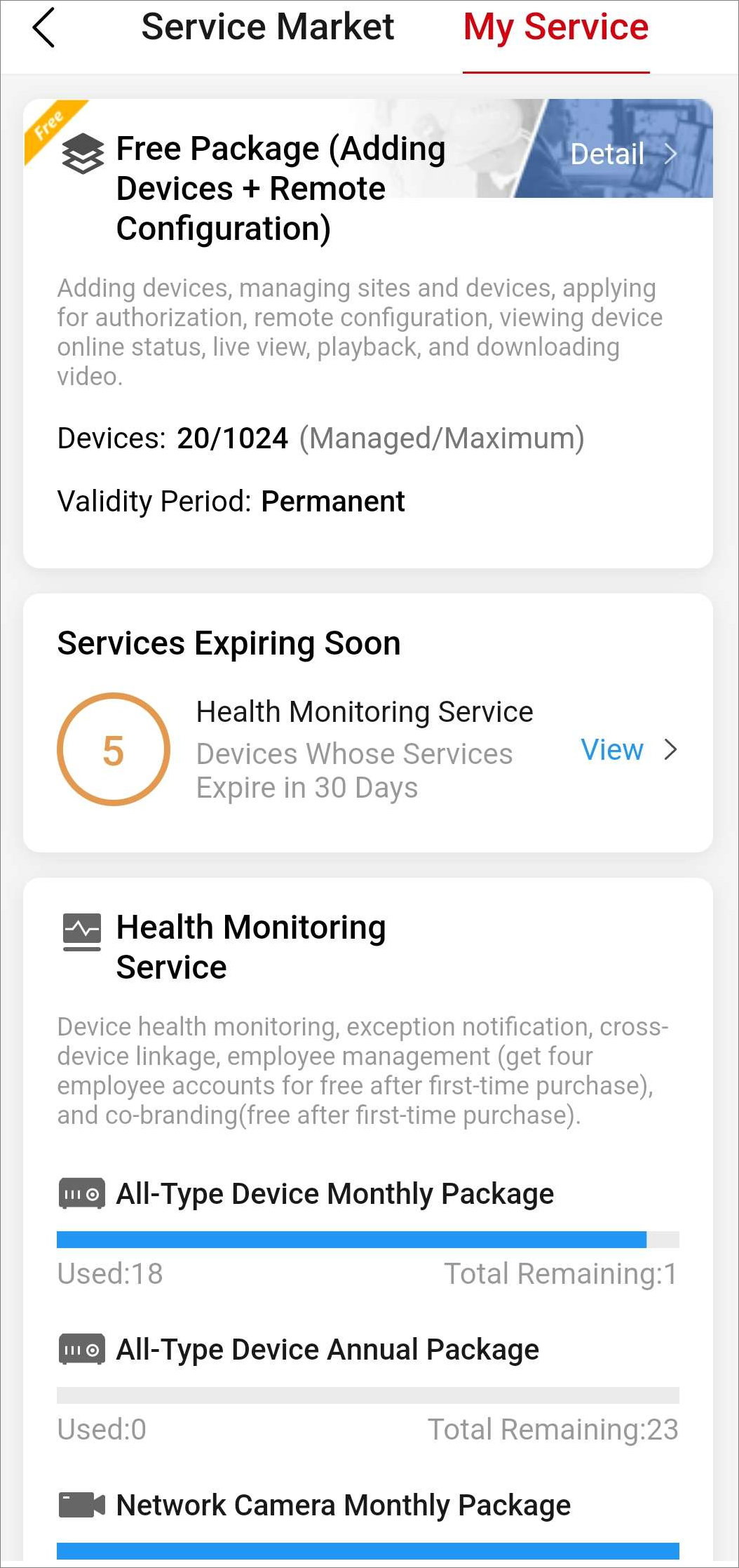
The page shows a service section only if you have purchased or are using the service.
The My Service page shows the following sections.
Trial Period Information
The page shows this section only when it is during the trial period.
This section presents the description and the end time of the trial period.
Free Package Information
This section presents the description of the free package, maximum number of manageable devices, and number of managed devices.
You can tap Detail in this section to view the differences between the free package and health monitoring package, and purchase health monitoring service packages by service keys.
Services Expiring Soon
The page shows this section only if there are services expiring soon.
You can tap View to go to the detail page for the service to renew it.
Health Monitoring Service
On the detail page for the health monitoring service, you can conveniently view the devices with services expiring in 30 days, devices with expired services, and devices with auto renewal, and perform operations as follows.
|
Operation |
Description |
|---|---|
|
Filter Devices by Site |
Tap All Sites and select a site to view the devices on the site and perform renewal / batch renewal, activation, etc. |
|
Filter Devices by Service Status |
Tap All, Expire Soon, Expired, or Auto Renewal to view devices with each service status. |
|
Renew Service for Device |
Tap |
|
Transfer Service |
Tap |
|
Enable/Disable Auto Renewal |
Tap |
|
Batch Renew for Devices |
Tap Batch Renew at the bottom, select devices, and tap OK to batch renew. |
|
Activate Service |
Tap Activate Service, select devices, select activation type, and tap OK. |
 to renew the
service for one device.
to renew the
service for one device. to transfer the
remaining service time to another device.
to transfer the
remaining service time to another device. to enable/disable auto renewal for
the device.
to enable/disable auto renewal for
the device.Cloud Storage Service
On the detail page for the cloud storage service, you can conveniently view the channels with services expiring in 30 days and channels with expired services, filter channels by service status, and renew the service for a specific channel.
Employee Account Add-On
On the detail page for the employee account add-on, you can conveniently view the added employees, and add, delete, enable, and disable employees.
Cloud Attendance Service
On the detail page for the cloud attendance service, you can conveniently view the cloud attendance systems expiring in 30 days and expired cloud attendance systems, and perform operations as follows.
|
Operation |
Description |
|---|---|
|
Filter Cloud Attendance Systems by Site |
Tap All Sites and select a site to view the cloud attendance systems on the site and renew systems. |
|
Filter Cloud Attendance Systems by Service Status |
Tap All, Expire Soon, Expired, or Trial to view systems with each service status. |
|
Renew Cloud Attendance System |
Tap |