Batch Configure Devices on LAN
You can batch configure online devices on the same Local Area Network (LAN) with the phone on which the Hik-Partner Pro Mobile Client runs. The available configurations include batch device activation and device IP address assignment, batch linking channels to NVR/DVR, and batch setting parameters for devices via templates. These functions allow you to complete basic configurations for multiple devices with much less efforts compared with configuring devices one by one.
-
This functionality is only available to certain models of cameras, NVRs, and DVRs.
-
Before batch configuring devices, make sure you have connected them to the same LAN with the phone on which the Hik-Partner Pro Mobile Client runs.
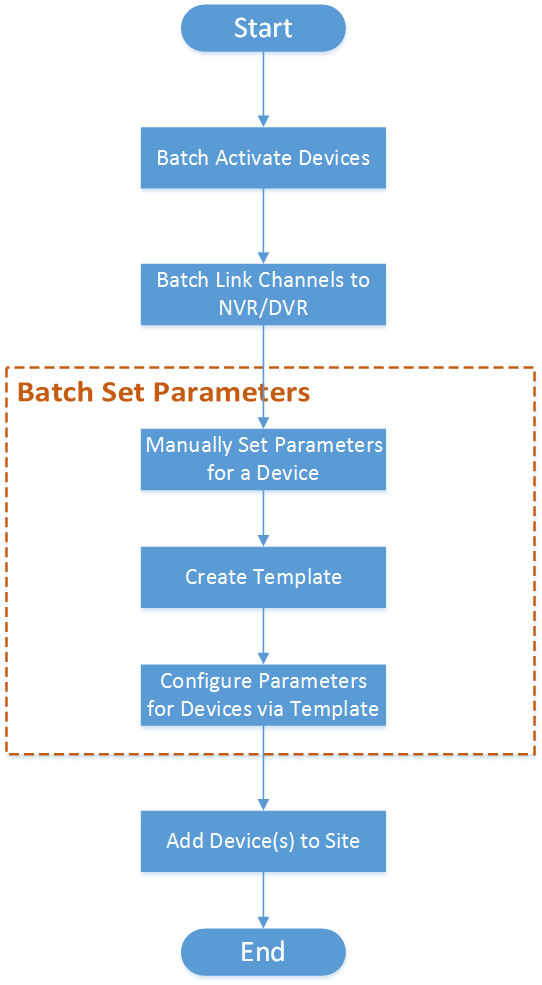
The flow chart for batch configuration of devices is shown below.
|
Step |
Sub-step |
Description |
|---|---|---|
|
Batch Activate Devices |
N/A |
Batch activate online devices on the same Local Area Network (LAN) with the phone on which the Hik-Partner Pro Mobile Client runs, and assign IP addresses for the activated devices. See Batch Activate Devices and Assign IP Addresses for Them for details. |
| Batch Link Channels to NVR/DVR |
N/A |
If the activated devices include NVR/DVR, link channels to NVR/DVR. See Batch Link Channels to NVR and DVR for details. |
|
Batch Set Device Parameters |
Manually Set Parameters for a Device |
Select an activated device and set its parameters manually. See Create Templates for Setting Parameters for details. |
|
Create Template |
Created a template based on the manually configured device. See Create Templates for Setting Parameters for details. |
|
|
Configure Parameters for Devices via Template |
Batch configure parameters for multiple devices via a selected template. See Batch Set Parameters for Devices for details. |
|
|
Add Device(s) to Site |
N/A |
If required, add the activated and configured device(s) to a Site. See Add Device by Scanning QR Code, Add Device by Entering Serial No., or Add Device by IP Address or Domain Name for details. |