Flow Chart of Visitor Management
The flow chart below shows the process of visitor settings management.
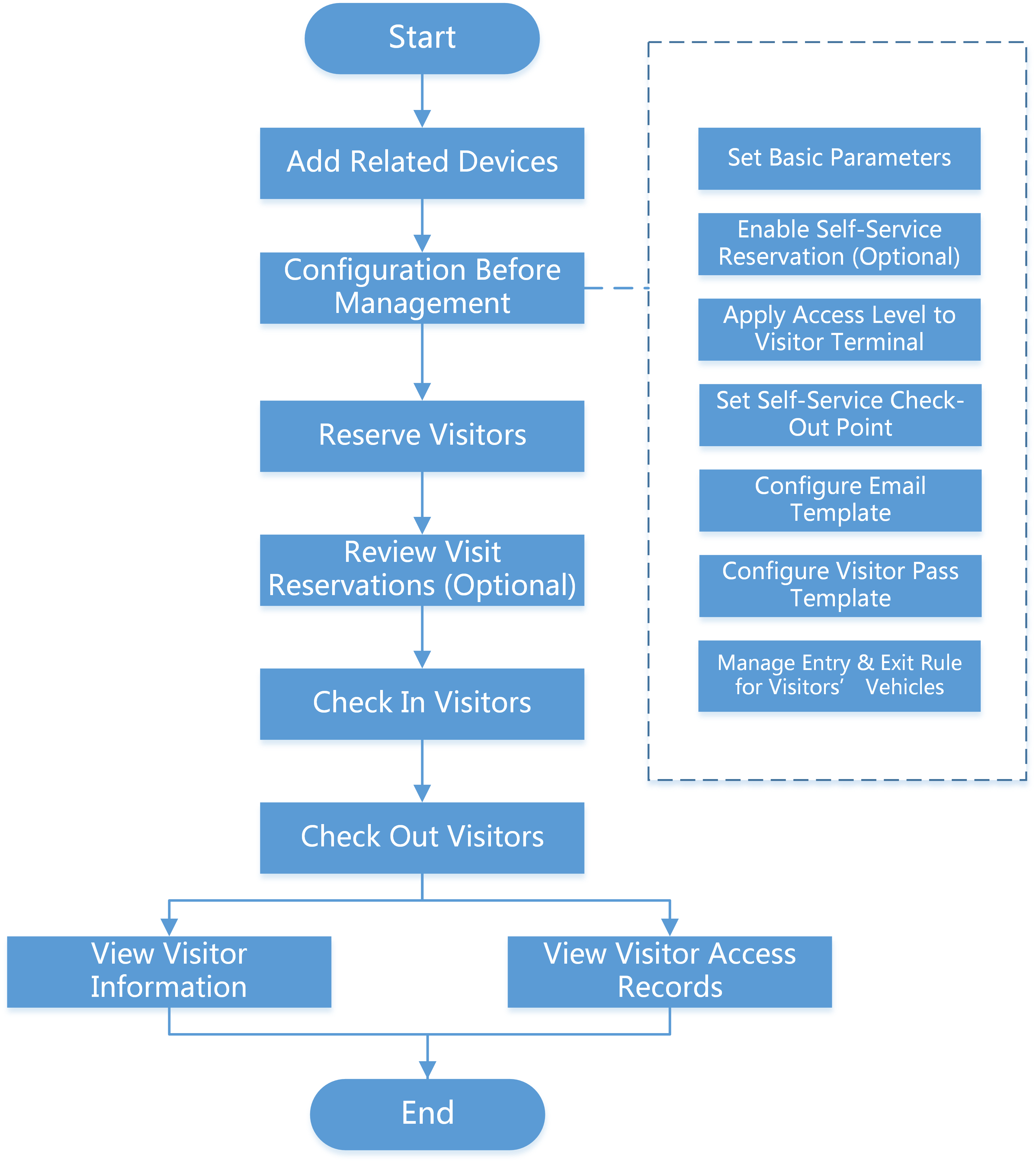 Figure 1 Flow Chart of Visitor
Management
Figure 1 Flow Chart of Visitor
Management|
Procedure |
Description |
|---|---|
|
Add Related Devices |
Add devices used for visitor reservation, check-in, check-out, authentication, etc. See Manage Visitor Terminals, Manage Access Control Device, and Manage Elevator Control Device for details. |
|
Configuration Before Visitor Management |
Before any operations in the visitor system, you need to set the parameters according to actual situation such as setting basic parameters to define the scenario for the visiting process, managing visitor types, adding access levels for visitors, etc. See Configurations Before Visitor Management for details. |
|
Manage Entry & Exit Rule for Visitors' Vehicles |
Register license plate number of the visitors' vehicles to allow the system to control the barrier to open when capture unit of parking lot detect license plate number. See Manage Entry & Exit Rule for Visitors' Vehicles. |
|
Reserve the Visitors |
Before visiting, visitors can make a reservation. The Administrator can make a reservation for the visitors by entering the visitor and host information on the platform. Visitors can also reserve by themselves. After self-reservation, the Administrator should review the visitor information to approve or disapprove the reservation. See Visitor Reservation for details. |
|
Visitor Check-In |
The platform supports checking in visitors both with or without a reservation. See Check In a Visitor Without Reservation and Check In a Reserved Visitor for details. |
|
Visitor Check-Out |
You should check out for the visitor before him/her leaves, or let visitors check out at self-service check-out point. After checking out, the visitor's access information will expire. See Visitor Check-Out for details. |
|
View and Delete Visitors |
View all checked-in visitors (including those who have checked out) in the visitor list and perform other operations such as deleting visitors. See View Visitor Information for details. |
|
Check Visitor Records |
Filter and check visitor records. See Check Visitor Access Records. |