Flow Chart of Video Security
The following flow chart shows the process of configurations and operations required for basic video security functions, such as live view and playback.
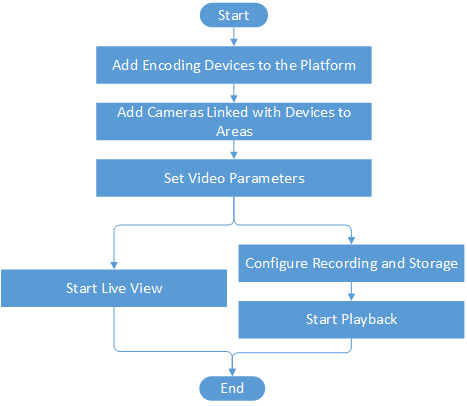 Figure 1 Flow Chart of Video Security
|
Procedure |
Description |
|---|---|
|
Add Encoding Devices to the Platform |
Add encoding devices to the platform by online detection, IP address, port segment, Hik-Connect DDNS, device ID, device ID segment, etc. For details, see Manage Encoding Device. |
|
Add Cameras Linked with Devices to Areas |
Group cameras linked with encoding devices to different areas according to the locations of the devices for convenient management. For details, see Add Camera to Area for Current Site and Add Camera to Area for Remote Site. |
|
Set Video Parameters |
Set network parameters, picture file format, display parameters, audio parameter, and so on for video security. For details, see Set Video Parameters. |
|
Configure Recording and Storage |
Define the periods during which video recording is activated. And set the storage location for the recorded video footage and the uploaded pictures (e.g., alarm related pictures). For details about configuring recording and storage, see Configure Storage and Recording. |
|
Start Live View or Playback |
Start playing live videos or video footage of cameras. For details, see Live View or Playback. |