Flow Chart of Alarm Detection
The following flow chart shows the process of the configurations and operations of alarm detection.
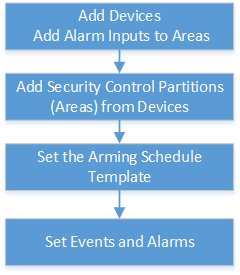 Figure 1 Flow Chart of Alarm
Detection
Figure 1 Flow Chart of Alarm
Detection-
Add Devices: Add security control devices to detect persons, vehicles, or other emergency events in the detection region. And then add alarm inputs to areas for management. Refer to Manage Security Control Device and Add Alarm Input to Area for Current Site for details.
-
Add Security Control Partitions (Areas) from Devices: Add alarm inputs and partitions (areas) from devices for arming or disarming zones, bypassing zones, and clearing alarms. Refer to Add Security Control Partitions (Areas) from Device for details.
-
Set the Arming Schedule Template: Set an arming schedule template for a specified partition (area) to specify the arming schedule of the alarm inputs in this partition (area). Refer to Configure Arming Schedule Template for details.
-
Set Events and Alarms: Set event and alarm parameters and linkage actions to view event and alarm details on the Client, timely remind the security personnel to handle related issues, or search history events and alarms when an emergency occurs. Refer to Event and Alarm for details.