Flow Chart of Parking Fee Collection
For paid parking lots that require a certain fee to park, the flow chart below shows the process of configuring parking fee collections.
Make sure you have added the relevant vehicle information to the platform and managed the vehicles as needed (e.g., categorize them into different types or add them to vehicle lists). Refer to Vehicle Management for details.
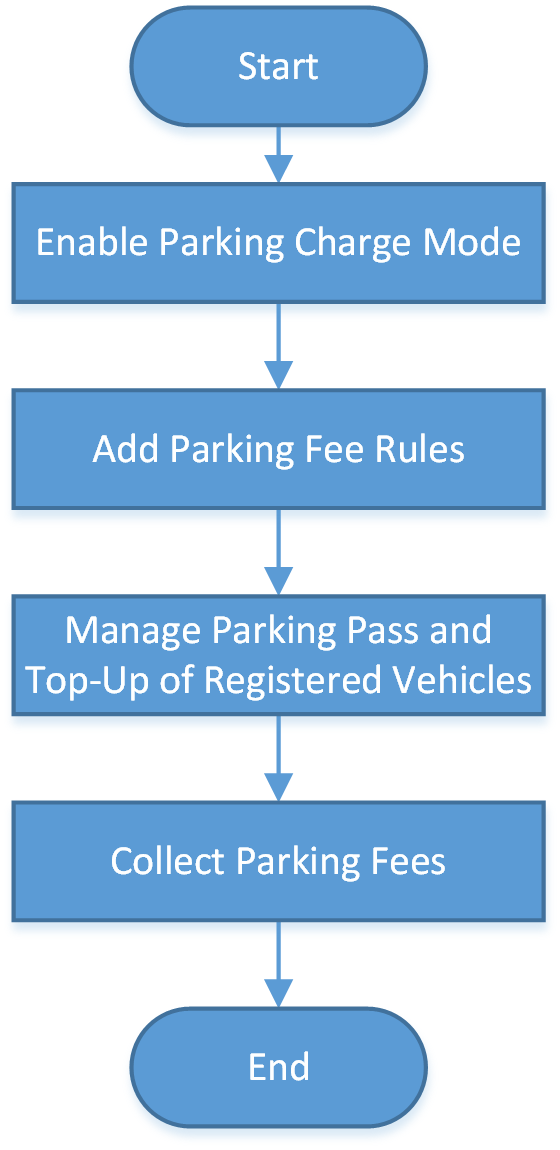 Figure 1 Flow Chart of Parking Fee
Collection
Figure 1 Flow Chart of Parking Fee
Collection|
Procedure |
Description |
|---|---|
|
Enable Parking Charge Mode |
To enable parking pass top up for registered vehicles or to charge other vehicles for temporary parking, you need to first set the parking fee mode to Charge. Refer to Enable Parking Charge Mode for details. |
|
Add Parking Fee Rules |
You can set parking fee rules for a parking lot, including rules for certain types of vehicles, the parking pass rule, the discount rule, and the parking fee rule for abnormal entry & exit. Once you set a rule, the platform will automatically calculate the fee for parking based on this rule and present the parking fee related information. Refer to Configure Parking Fee Rules for details. |
|
Manage Parking Pass and Top-Up of Registered Vehicles |
If a vehicle is topped up with a parking pass of a parking lot, it can enter and exit that parking lot as a registered vehicle and park without paying any additional fees. Refer to Top Up Parking Pass for details. |
|
Collect Parking Fees |
Registered vehicles can park in a parking lot without paying additional fees if they have been topped up with a parking pass, whereas other vehicles (e.g., temporary vehicles, vehicles in list, and vehicles with abnormal entries/exits) can pay for parking at the booth or in the toll center by searching for their parking information by license plate No., swiping the temporary card, or scanning the parking receipt. Refer to Pay in Toll Center for details. |