Flow Chart of Video Intercom
For the first time, you can follow the flow chart to perform configurations and operations.
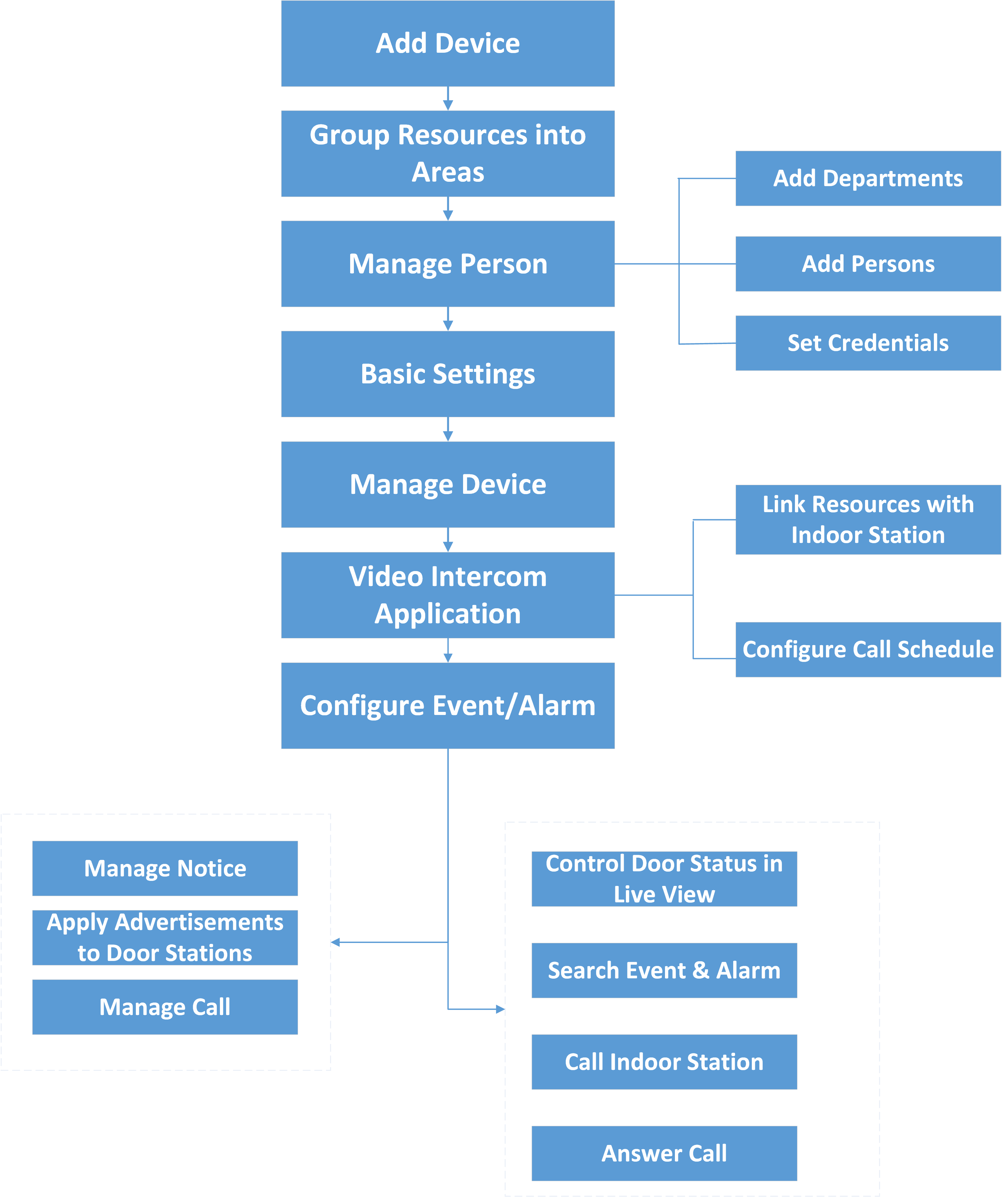 Figure 1 Flow Chart of Video
Intercom
Figure 1 Flow Chart of Video
Intercom-
Add Device: Add video intercom devices (such as main station, outer door station, indoor station, and door station) to HikCentral Professional and configure device parameters remotely. For more details, refer to Manage Video Intercom Device and Configure Device Parameters.
-
Group Resources into Areas: After adding the devices to the system, you need to group the devices' resources (such as doors and cameras) into different areas according to the resources' locations. For details, refer to Area Management.
-
Manage Person: Add departments and persons to the system, and set credential information. For details, refer to Person Management.
-
Basic Settings: Add call recipients, add call schedule templates, add receiving schedule template, and configure call parameters. For details, refer to Basic Settings of the Platform.
-
Manage Device: Set location information for video intercom devices and apply the settings to devices. For details, refer to Manage Video Intercom Device.
-
Video Intercom Application: Add call schedules and apply them to devices, link resources (camera, person, and doorbell) to indoor stations. For details, refer to Video Intercom Application.
-
Configure Event / Alarm: Configure event and alarm for video intercom resources. For more details, refer to Event and Alarm.
-
Manage Notice: Add notices and apply them to indoor stations. For details, refer to Manage Notices.
-
Apply Advertisements to Door Stations: Apply pictures or video to door stations as advertisements. See Apply Advertisements to Door Stations.
-
Manage Call: Call indoor stations and view recents. Fore details, refer to Call & Talk.
-
Operations on Control Client: After the above configurations on the Web Client, you can control door status during live view, search event and alarm, call indoor station and answer call. For more details, refer to User Manual of HikCentral Professional Control Client.
Note:The doors of video intercom device can be used similarly as the doors of access control device. For more details about related configurations and operations of the doors, refer to Flow Chart of Door Access Control.