Flow Chart of Floor Access Control
The following flow chart shows the process of the configurations and operations of floor access control.
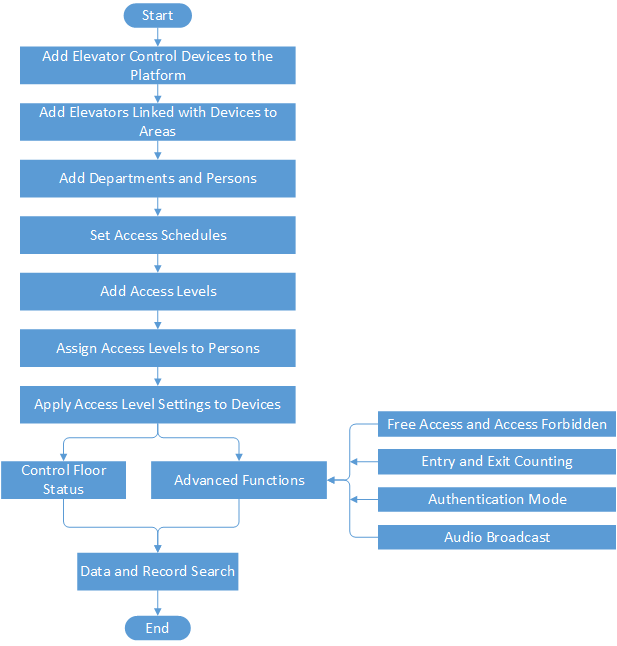 Figure 1 Flow Chart of Floor Access
Control
Figure 1 Flow Chart of Floor Access
ControlSome functions in this flow chart need the License. For details about License, refer to License Management.
|
Procedure |
Description |
|---|---|
|
Add Elevator Control Devices to the Platform |
You need to add elevator control devices to the system. For details, refer to Manage Elevator Control Device. |
|
Add Elevators Linked with Devices to Areas |
Group elevators linked with added devices for management. Refer to Add Elevator to Area for Current Site for details. |
|
Add Departments and Persons |
Add person information and set person's credentials (such as PIN, card, and fingerprint). For details, refer to Person Management. |
|
Set Access Schedules |
The access schedule defines when the person can access the access point with credentials. For details, refer to Set Access Schedule Template. |
|
Add Access Levels |
An access level is a group of floors. After assigning access level, the assigned objects can get access to these floors during the authorized time period. For details, refer to Manage Access Level. |
|
Assign Access Levels to Persons |
You need to assign access levels to persons, so that the assignees can access the access points in the access levels. You can assign an access level to multiple persons or assign multiple access levels to a person or a department. For details, refer to Assign Access Level. |
|
Apply Access Level Settings to Devices |
After setting the linkage between the persons and the access level, you need to apply the person's access level settings to the elevator control device of the elevators linked to the access level to take effect. After that, the persons can access these floors during the authorized time period defined by the related access level. For details, refer to Apply Persons' Access Levels to Device. |
|
Control Floor Status |
You can manually change the floor status to temporary access, access with credential, free access, or access forbidden. Refer to Elevator Control for details. |
|
Advanced Functions |
Refer to Configure Free Access and Access Forbidden Rules, Add Entry and Exit Counting Group, Configure Authentication Mode, and Add Audio Broadcast for details. |
|
Data and Record Search |
Refer to Search Access Records and Search Data Recorded on Access Control Devices and Elevator Control Devices for details. |