Add Parking Fee Rule for Registered Vehicles
A parking pass costs a certain amount of money. Within the validity period of a parking pass, the vehicle can enter and exit a specific parking lot as a registered vehicle, so that it can park in that parking lot without paying any fees. You can add rules for parking passes.
Make sure that the parking fee mode has been set to Charge. Refer to Enable Parking Charge Mode for how to set the parking fee mode.
-
On the top navigation bar, select
 > Passing Management > Parking Lot.
-
Click Add beside Parking Fee Rule
for Registered Vehicle to enter the Add Parking Pass Rule
pane.
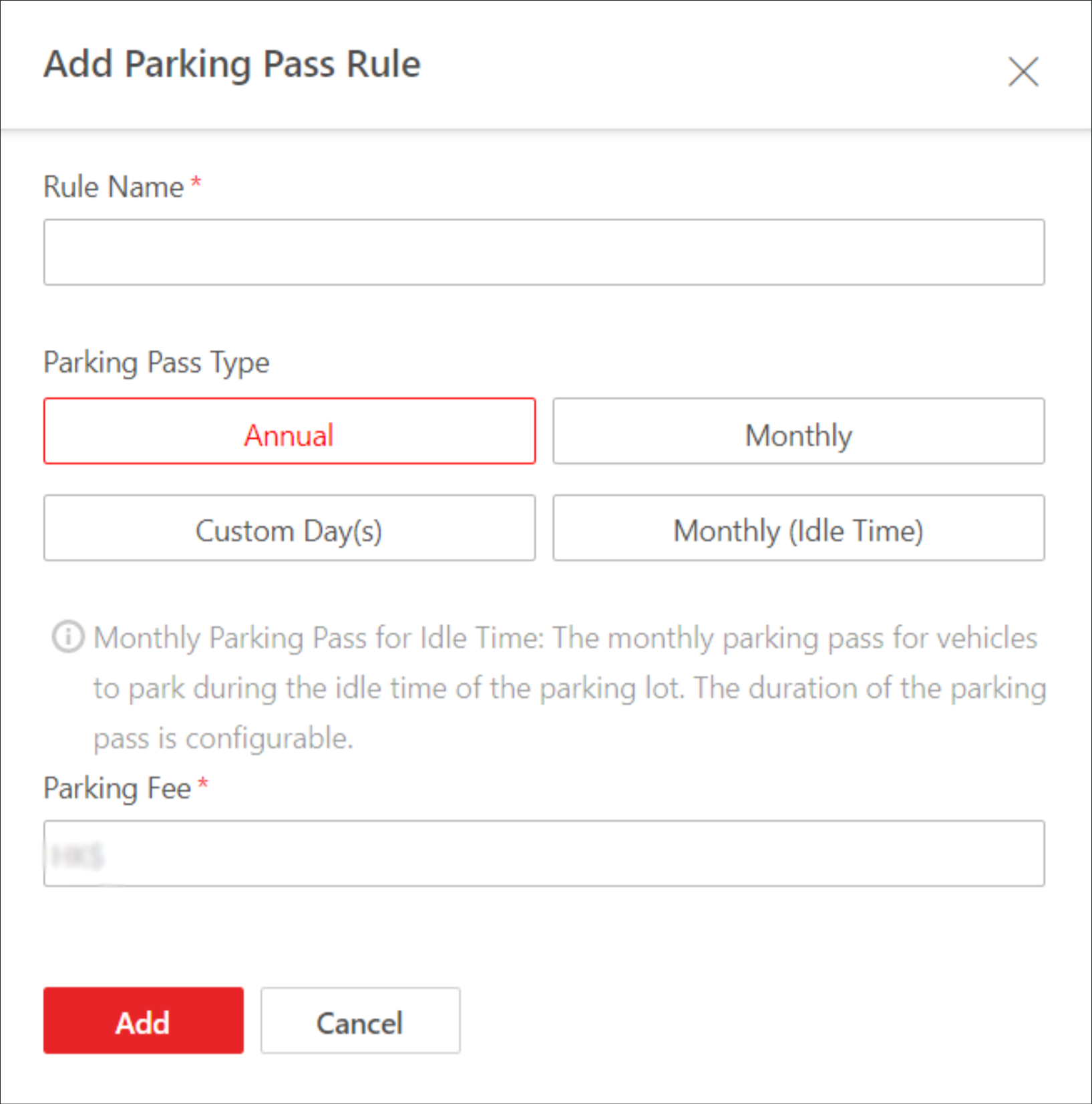 Figure 1 Add Parking Pass Rule
Pane
Figure 1 Add Parking Pass Rule
Pane - Optional:
Perform the following operations if needed.
Option Description Copy a Rule to Other Parking Lot(s)
Click
 and select the
parking lot(s) to which the rule is to be copied.
and select the
parking lot(s) to which the rule is to be copied.Edit a Rule
Click
 to edit a rule.
Delete a Rule
Click
 to delete a
rule.
to delete a
rule.