Top Up Parking Pass

A parking pass costs a certain amount of money and is valid for a specific time period. If a vehicle is topped up with a parking pass, it can enter and exit a specific parking lot as a registered vehicle and park in that parking lot without paying any fees. You can top up parking passes for one or multiple vehicles at the same time via Top-Up Management.

Make sure you have added parking pass rule(s) to the platform. See Add Parking Fee Rule for Registered Vehicles for more details.

  1. On the top navigation bar, select > Passing Management > Parking Lot.
  2. On the left navigation pane, click Top-Up Management.
  3. Select one or multiple vehicles in the list, and click Top-Up in the upper-left corner.
    Note:

    You can also click Top Up All to top up for all vehicles in the list.
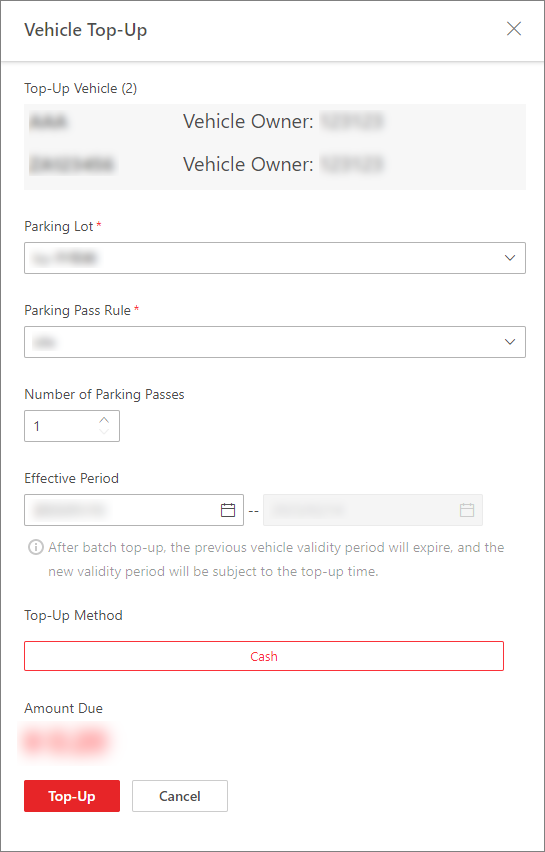
    Figure 1 Vehicle Top-Up Pane
  4. Select a parking lot for the vehicle(s) to park in.
  5. Select a parking pass rule from the drop-down list.
  6. Set the number of parking passes to be topped up.

    If the number here is set to 2 and the type of parking pass you selected in Parking Pass Rule is an annual pass, the parking pass will be valid for 2 years.

  7. Set the effective period of the parking pass.
    Note:

    You can only select the start date for the parking pass; the end date will be automatically calculated by the platform according to the parking pass rule and the number of parking passes you set.

  8. Select the top-up method.
    Note:

    Currently, the platform only supports cash top-ups when you are topping up for more than one vehicle, whereas you can select from Cash and Account Balance when topping up for one vehicle only. The amount due will be automatically calculated according to the parking pass rule and the number of parking passes you set.

  9. Click Top-Up.