Set Basic Parameters of Parking Management
On the Web Client, you can select the statistical source of parking and enable fuzzy search for the Self-Service Vehicle Finding Client in the parking lot to help vehicle owners find their vehicles more quickly and conveniently. The date format displayed on the Self-Service Vehicle Finding Client or display screens of the parking lot can also be predefined.
On the top navigation bar, select  > Passing Management > Parking Lot > Basic Configuration > Basic Parameter.
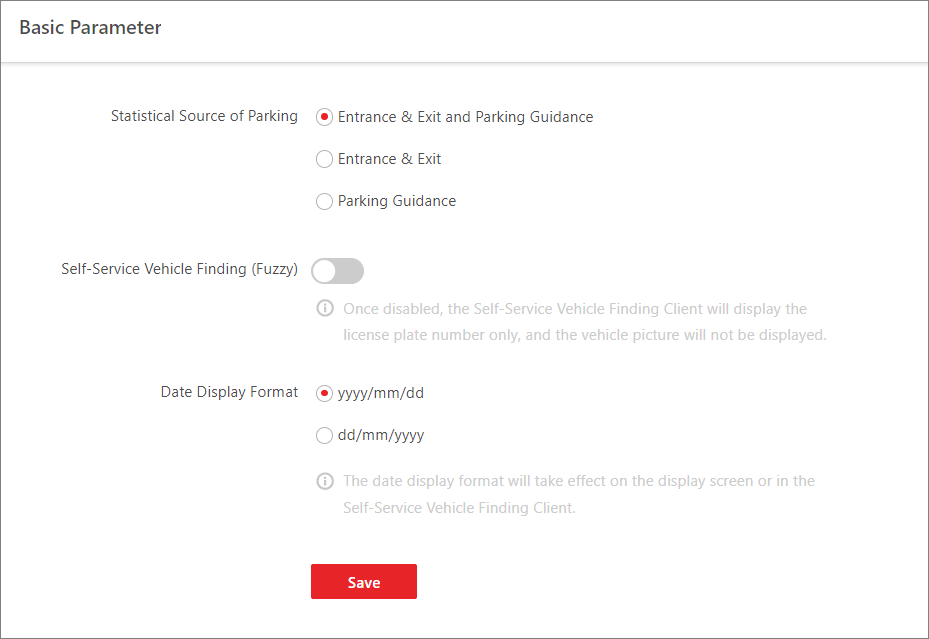 Figure 1 Set Basic Parameters
Statistical Source of Parking
Select a source for parking statistics. The following table shows the relations between statistics types and sources.
|
Mode |
Statistics Type |
Source |
|---|---|---|
|
Entrance & Exit and Parking Guidance Mode |
(Web Client) Real-Time Parking Space Statistics in Operation Report |
Entrance & Exit |
|
(Web Client) Parking Space Occupancy Statistics in Operation Report |
Parking Guidance |
|
|
(Web Client) Parking Duration Distribution in Operation Report |
Entrance & Exit |
|
|
(Web Client) Traffic Flow Statistics in Operation Report |
Entrance & Exit |
|
|
(Web Client & Control Client) Parking Space Overview |
Entrance & Exit |
|
|
(Control Client) Occupancy Rate of Parking Lot in Parking Space Monitoring |
Entrance & Exit |
|
|
(Control Client) Occupancy Rate of Floor in Parking Space Monitoring |
Parking Guidance |
|
|
Entrance & Exit Mode |
(Web Client) Real-Time Parking Space Statistics in Operation Report |
Entrance & Exit |
|
(Web Client) Parking Space Occupancy Statistics in Operation Report |
By default, the statistics is not displayed. You can configure the source by yourself. |
|
|
(Web Client) Parking Duration Distribution in Operation Report |
Entrance & Exit |
|
|
(Web Client) Traffic Flow Statistics in Operation Report |
Entrance & Exit |
|
|
(Web Client & Control Client) Parking Space Overview |
Entrance & Exit |
|
|
(Control Client) Occupancy Rate of Parking Lot in Parking Space Monitoring |
Entrance & Exit |
|
|
(Control Client) Occupancy Rate of Floor in Parking Space Monitoring |
Entrance & Exit |
|
|
Parking Guidance Mode |
(Web Client) Real-Time Parking Space Statistics in Operation Report |
Parking Guidance |
|
(Web Client) Parking Space Occupancy Statistics in Operation Report |
Parking Guidance |
|
|
(Web Client) Parking Duration Distribution in Operation Report |
Parking Guidance |
|
|
(Web Client) Traffic Flow Statistics in Operation Report |
By default, the statistics is not displayed. You can configure the source by yourself. |
|
|
(Web Client & Control Client) Parking Space Overview |
Parking Guidance |
|
|
(Control Client) Occupancy Rate of Parking Lot in Parking Space Monitoring |
Parking Guidance |
|
|
(Control Client) Occupancy Rate of Floor in Parking Space Monitoring |
Parking Guidance |
Self-Service Vehicle Finding (Fuzzy)
Switch on Self-Service Vehicle Finding (Fuzzy) to enable fuzzy search for the Self-Service Vehicle Finding Client. Once enabled, the Self-Service Vehicle Finding Client will display license plate numbers without displaying vehicle pictures when finding vehicles, so that the time consumption in vehicle finding will be reduced.
For details, refer to Self-Service Vehicle Finding Client.
Date Display Format
Select yyyy/mm/dd or dd/mm/yyyy in the Date Display Format field to determine the date format displayed on the Self-Service Vehicle Finding Client or display screens of the parking lot.