Set Additional Parking Fee Rule

You can set additional parking fee rules, including free parking duration after payment, and the parking fee rule for multiple vehicles under one account, which can help you to manage parking fee more flexibly.

Make sure that the parking fee mode has been set to Charge.

  1. On the top navigation bar, select > Passing Management > Parking Lot > Parking Lot Management.
  2. Click Settings to enter the settings page of a parking lot.
  3. Click the Parking Fee Rule tab.
  4. Click Edit beside Additional Configuration to enter the Additional Configuration pane.
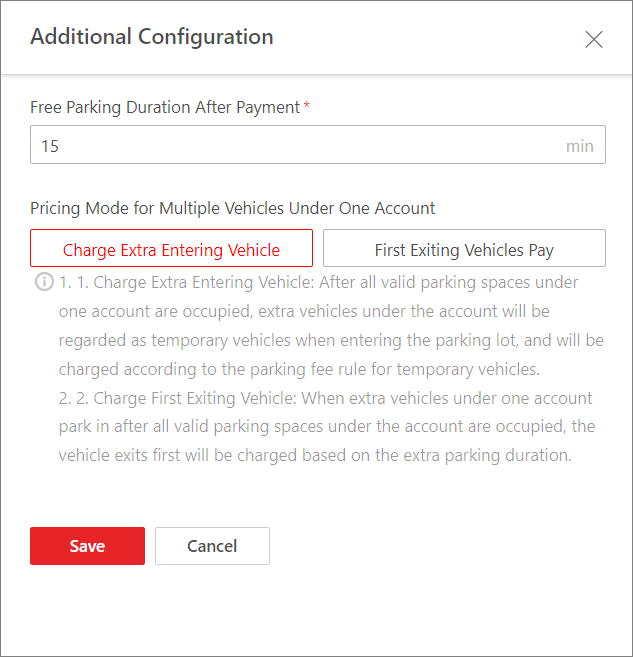
    Figure 1 Additional Configuration
  5. Enter the parking duration that is free of charge after paying the parking fee.
  6. Optional: Switch on Parking Fee Rule for Multiple Vehicles Under One Account, and select Extra Vehicles Pay or First Exiting Vehicles Pay.
    Extra Vehicles Pay

    After all valid parking spaces under one account are occupied, extra vehicles under the account will be regarded as temporary vehicles when entering the parking lot, and charged according to the parking fee rule for temporary vehicle.

    First Exiting Vehicles Pay

    When extra vehicles under one account park in after all valid parking spaces under the account are occupied, the vehicle exiting first will be charged based on the extra parking duration.

  7. Click Save.