Appearance
Main Unit
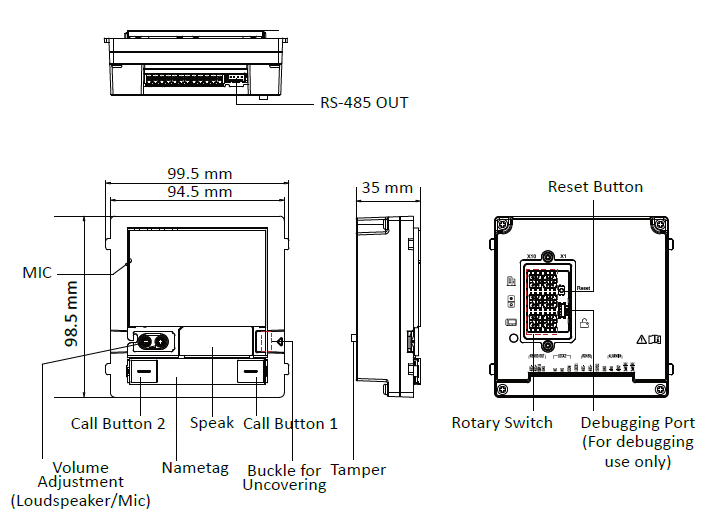
-
Loudspeaker/Mic Adjustment Area: Press the buckle and push the tag to the left to uncover the metal cover. Remove the dust-proof plug and use drill to adjust the volume of loudspeaker and the microphone. (The first is for the loudspeaker and the second is for the Mic.)
-
Reset Button:Reset AP Mode Password: Hold the button for 5 s.
-
Restore Factory Settings: Hold the button for 10 s.
-
DIP Switch: Set the door station's DIP switch address and video intercom system can find the door station according to the address.
-
Call Button: By default, press call button 1 to call Room No.1 and press call button 2 to call Room No.2.
-
Name Tag:Remove the metal cover and you can stick a name tag according to your preference.
Name tag 1: Two call buttons Left: Press once to call a specific room No. Hold the button for 10 s to enable the device AP mode. Right: Press once to call a specific room No. Hold the button for 10 s to synchronize the device parameters to the web, including contacts, language, device time, etc.
Name tag 2: one call button Press once to call a specific room No.
Name tag 3: No call button