Set Entry & Exit Rule for Temporary Vehicles

Temporary vehicles are the ones that are not added to the platform and just park in the parking lot for a certain period. You can set the entry & exit rule for temporary vehicles, which can help you to manage the entry and exit of them more easily.

  1. On the top navigation bar, select > Passing Management > Parking Lot > Parking Lot Management.
  2. Click Settings to enter the settings page of a parking lot.
  3. Click Entry & Exit Rule.
  4. Click Edit beside Entry & Exit Rule for Temporary Vehicles to open the following pane.
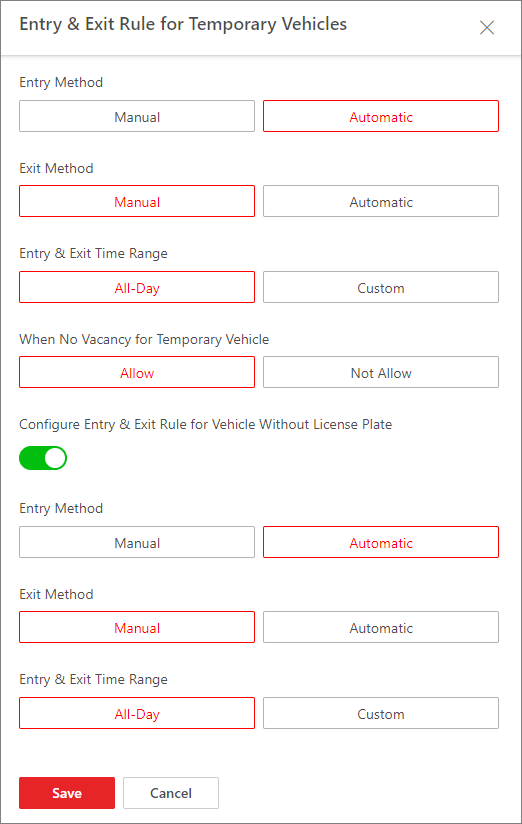
    Figure 1 Entry & Exit Rule for Temporary Vehicles
  5. Set the rule.
    Entry Method

    How the barrier gate is opened when a vehicle enters.

    Exit Method

    How the barrier gate is opened when a vehicle exits.

    Entry & Exit Time Range

    The period in which the vehicles are allowed to enter and exit.

    Note:

    This parameter is configurable only when one of the Entry Method and Exit Method or both of them are set to Automatic.

    When No Vacancy for Temporary Vehicle

    Whether to allow the temporary vehicles to enter when where are no vacant parking spaces.

    Configure Entry & Exit Rule for Vehicle Without License Plate

    Set a rule for the vehicle's automatic or manual passing at entry or exit without license plate.

  6. Click Save.