You
can set the entry & exit mode
for
a parking lot, which can help you manage the entry and exit of vehicles
more
easily.
-
On the top navigation bar, select .
-
On the left navigation pane, click Parking Lot
Management.
-
Click Settings to enter the settings page of a parking
lot.
-
Click Entry & Exit Rule.
-
Click Edit beside Entry &
Exit Mode.
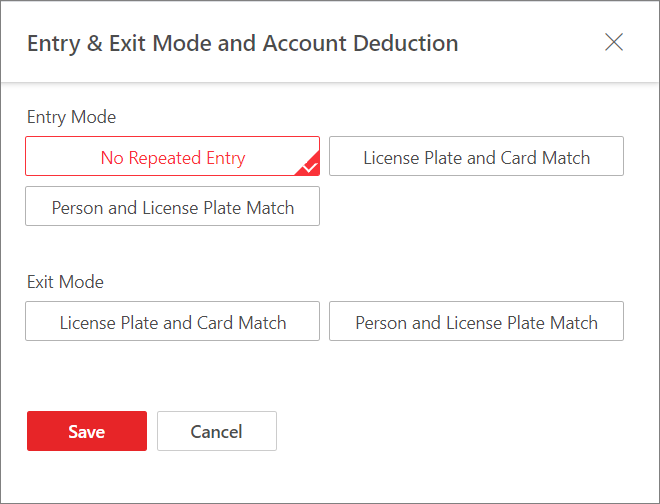 Figure 1 Set Entry & Exit
Mode
Figure 1 Set Entry & Exit
Mode
-
Select the entry mode and exit mode accordingly.
- Entry Mode
-
The condition in which a vehicle is allowed to
enter.
- No Repeated Entry
-
Repeated entry for an vehicle is not
allowed.
- License Plate and Card Match
-
The vehicle is allowed to enter only
when the license plate and the card match.
- Person and License Plate Match
-
The vehicle is allowed to enter only
when the driver and the license plate match.
Note:
The License Plate and Card
Match mode and Person
and License Plate Match mode cannot be
selected at the same time.
- Exit Mode
-
The condition in which a vehicle is allowed to
exit.
-
Click Save.
 > Passing Management > Parking Lot.