Search for Passing Vehicles Detected by Entrances & Exits
If the license plate number of a vehicle is recognized by cameras or capture units linked to an entrance and exit, you can search for the related vehicle passing information.
-
On the top navigation bar, select
 > Passing Management > Parking Lot > Search > Passing Vehicle Search.
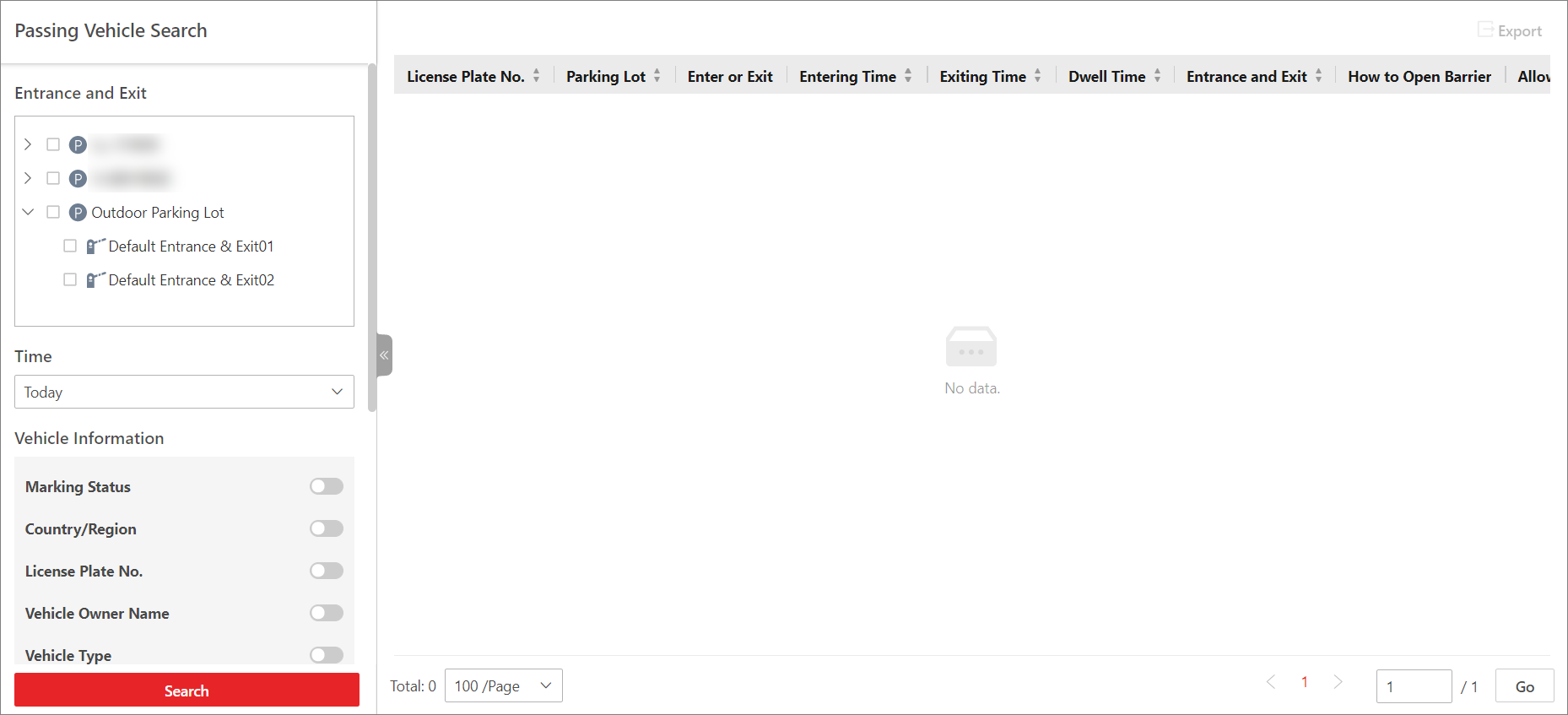 Figure 1 Passing Vehicle Search
Page
Figure 1 Passing Vehicle Search
Page - Select one or multiple entrances and exits where you want to search for the vehicle passing records.
- Select Today, Yesterday, Current Week, Last 7 Days, or Last 30 Days from the drop-down list as the time range for search, or click Custom Time Interval to customize a time range.
-
Switch on and set the search condition(s) according to your needs. Here we only
introduce conditions that may confuse you.
- Country/Region
-
Select the country/region where the vehicle's license plate number is registered.
- License Plate No.
-
-
No License Plate: Search for vehicles without license plates.
-
With License Plate: Enter a vehicle's license plate number or part of it.
-
- Enter or Exit
-
Select whether the vehicle is entering or exiting.
- How to Open Barrier
-
Select how the barrier gate is opened when a vehicle enters/exits the parking lot. Manual indicates that a security guard manually controlled the barrier gate to open after identifying the vehicle owner; Auto Allow for Entry and Exit indicates that the barrier gate opened automatically after the license plate number was recognized by a capture unit; Not Opened indicates that the barrier gate did not open even after the capture unit recognized the license plate number.
- Reason
-
Select the reason(s) for allowing or not allowing the vehicle to enter/exit from the drop-down list.
- Vehicle List
-
Select from the drop-down list to search for records of temporary vehicles, visitor vehicles, registered vehicles, or vehicles in the blocklist or other custom lists.
- Additional Information
-
The item(s) of additional vehicle information you customized. For how to customize vehicle information, refer to Customize Vehicle Information.
-
Click Search.
The matched results will be displayed on the right.
- Optional:
Perform the following operations as needed.
Option Description View Vehicle Details
Click a license plate number in the License Plate No. column to open the vehicle details pane.
You can view the captured picture and information about the vehicle owner, the vehicle, and details related to its entry/exit.
View Owner's Picture
Click a license plate number, and click the name of the vehicle owner to view pictures of the owner, including an uploaded profile photo and a picture captured at the entrance & exit.
Note:This operation can only be performed if the entry & exit modes of the parking lot is set to Person and License Plate Match. For details about setting the entry/exit modes, refer to Set Entry & Exit Mode.
Export a Passing Vehicle
Click Export and select Excel or CSV as the format of the exported file.
Note:-
If you select Excel as the file format, you can check Export Picture to save pictures contained in the search results to the local PC with the exported file.
-
No more than 500 passing vehicles with captured pictures can be exported in the Excel format at one time. If the number exceeds 500, you need to go to the Control Client to export them.
-
No more than 100,000 passing vehicles without captured pictures can be exported at one time.
-