Fast moving detection is used to detect suspicious running and chasing,
over-speed, and fast moving. It will trigger alarm when an object is moving fast and send
notification to arming host so that necessary actions can be taken in advance.
-
Go to .
-
Select a camera.
-
Click Fast Moving.
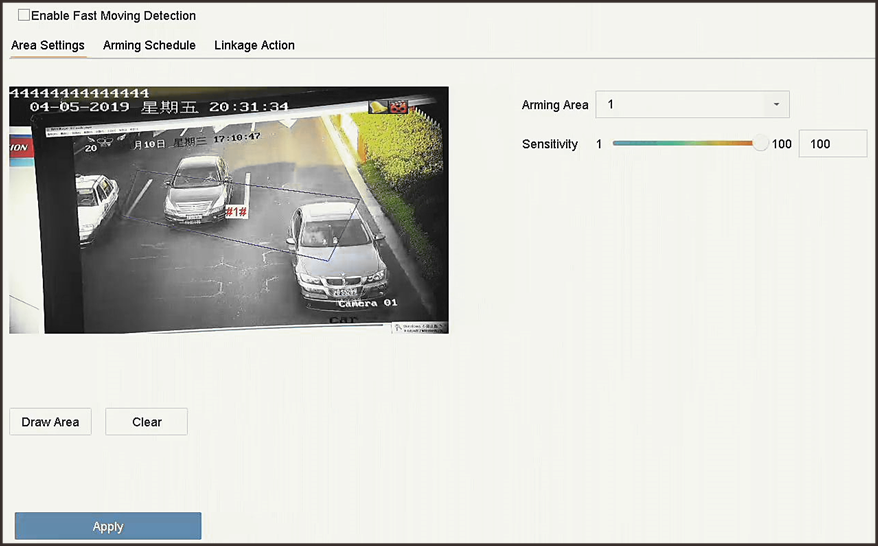 Figure 1 Fast Moving
Detection
Figure 1 Fast Moving
Detection
-
Check Enable Fast Moving.
- Optional:
Check Save VCA Picture to save the captured fast moving
detection pictures.
-
Set fast moving detection parameters.
-
Select Arming Region.
Up
to 4 regions are selectable.
-
Click Draw Area to draw a quadrilateral in the
preview window by specifying four vertices of the area.
-
Set Sensitivity.
- Sensitivity
-
Similarity of the background image to the
object. The higher the value is, more easily the
detection alarm will be triggered.
-
Set the arming schedule. Refer to Configure Arming Schedule.
-
Set the linkage actions. Refer to Configure Linkage Actions.
-
Click Apply.