Set Self-Service Check-Out Point
After setting self-service check-out points, visitors can check out by credentials at the self-service check-out points without the help of receptionists. If you have issued a card to a visitor when you check in the visitor, after checking out, the visitor should put the card in the place for card collection. The access permission granted via visitor cards, fingerprints, face pictures, and QR codes will expire automatically.
Make sure you have added at least one device that supports this function.
This function needs to be supported by devices.
-
On the top left of the Web Client, select
 > Passing Management > Visitor > Basic Configuration > Self-Service Check-Out Point.
-
Select
one
or more doors and click Add.
Note:
After setting self-service check-out points, the visitors can check out at the points according to the assigned access levels by swiping cards or fingerprint/face authentication.
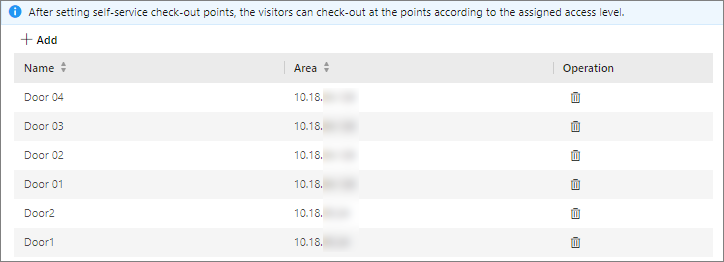 Figure 1 Set Self-Service
Check-Out Point Page
Figure 1 Set Self-Service
Check-Out Point Page - Optional:
Select a self-service check-out point and click
 to cancel setting the door as a
self-service check-out point.
to cancel setting the door as a
self-service check-out point.