Set Parameters for Patrol Management
You can set parameters including Local Storage Configuration, Notification Time, and Detection Frequency to manage patrols and patrol-related attachment storage.
Make sure you have configuration permissions for patrol management.
-
On the top left of the Web Client, select
 > Integrated Service > Patrol > Basic Configuration > Parameter Configuration.
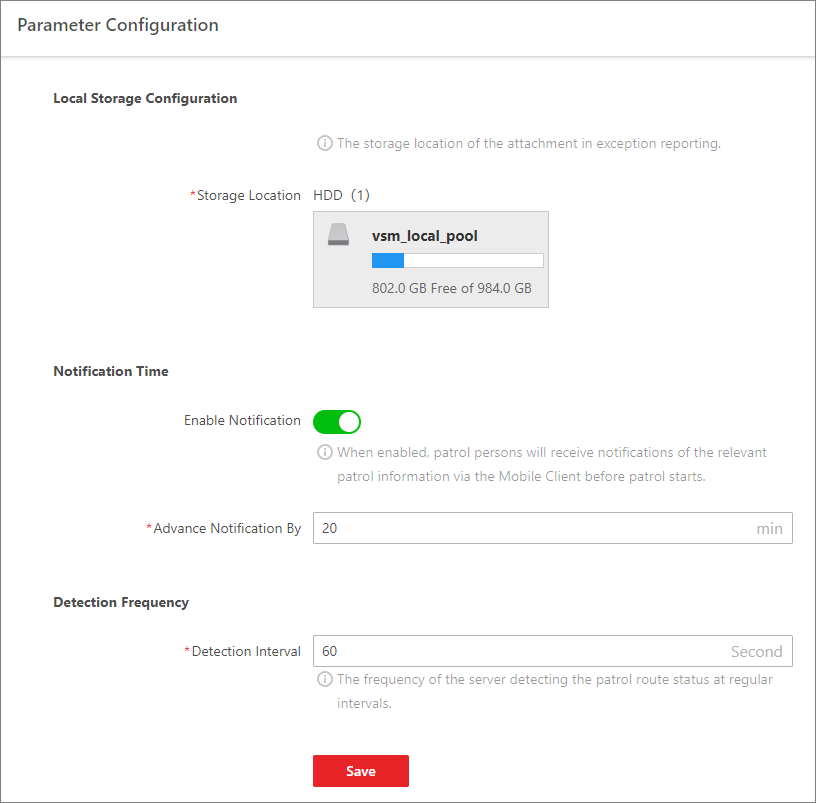 Figure 1 Parameter Configuration
 -
Configure the following parameters according to your needs.
- Local Storage Configuration
-
Configure the Storage Location for the attachments in exception reporting.
- Notification Time
-
When the notification is enabled, patrol persons will receive notifications of the relevant patrol information via Mobile Client before patrols start. After it is enabled, you can edit the time by which the notification is advanced.
- Detection Frequency
-
Set the Detection Interval at which the server detects the patrol route status.