Add Patrol Person Group
You can select persons to form a patrol person group and set a patrol mode for the group.
Make sure you have configuration permissions for patrol management and permissions to access the related person groups.
-
On the top left of the Web Client, select
 > Integrated Service > Patrol > Patrol Management > Patrol Person Group.
-
Click Add.
Note:
If you have already added a patrol person group before, click
 on the top left of the
page to add another one.
on the top left of the
page to add another one.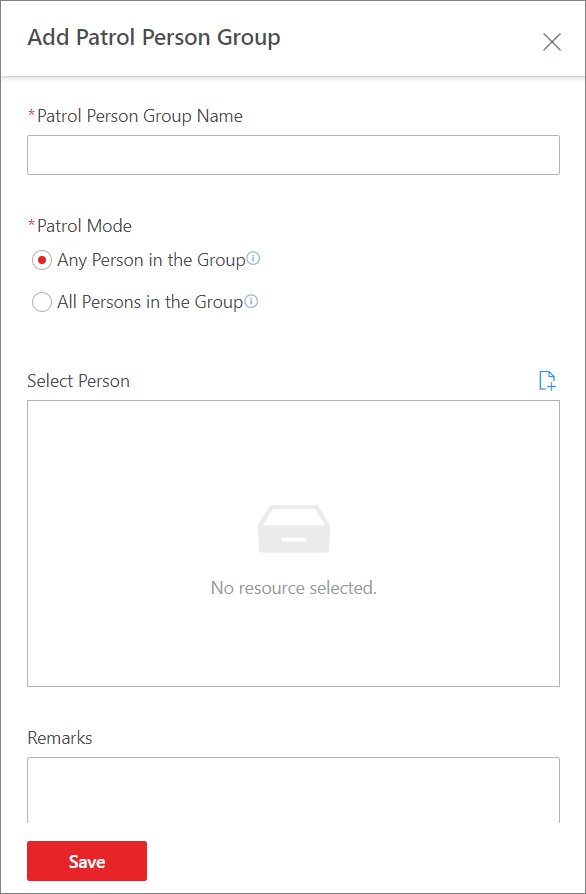 Figure 1 Add Patrol Person
Group
Figure 1 Add Patrol Person
Group -
Click
 to select persons to form the
patrol person group.
Note:
to select persons to form the
patrol person group.
Note:-
No more than 100 persons can be selected for one patrol person group.
-
You can also skip this step for now and add persons to the patrol person group later.
-
- Optional:
Perform the following operations according to your needs.
Option Description Edit a Patrol Person Group
On the left pane, select a patrol person group and click
 on the top to open
the Edit Patrol Person Group pane. You can edit the name, patrol
mode, person(s), and remarks of the group accordingly.
on the top to open
the Edit Patrol Person Group pane. You can edit the name, patrol
mode, person(s), and remarks of the group accordingly.Delete Patrol Person Groups
On the left pane, select a patrol person group and click
 on the top to delete
the selected group. Click
on the top to delete
the selected group. Click  > Delete All to delete all patrol person groups.
Search for Patrol Person Groups
On the left pane, enter keyword(s) in the search box to search for patrol person groups.
Add Persons to a Patrol Person Group
Select a patrol person group and click Add to add patrol persons to the patrol person group.
Search for Persons in a Patrol Person Group
Select a patrol person group and enter keyword(s) in the upper-right search box to search for patrol persons in the patrol person group.
Delete Persons from a Patrol Person Group
Select a patrol person group, select the patrol persons to be deleted, and click Delete. You can also click
> Delete All to delete all patrol persons from the group.