Search for Patrol-Related Event Records
You can search for and export patrol-related event records, including patrol events and exception reporting.
Make sure you have the operation permission for patrol search.
-
On the top left of the Web Client, select
 > Integrated Service > Patrol > Search > Event Record Search.
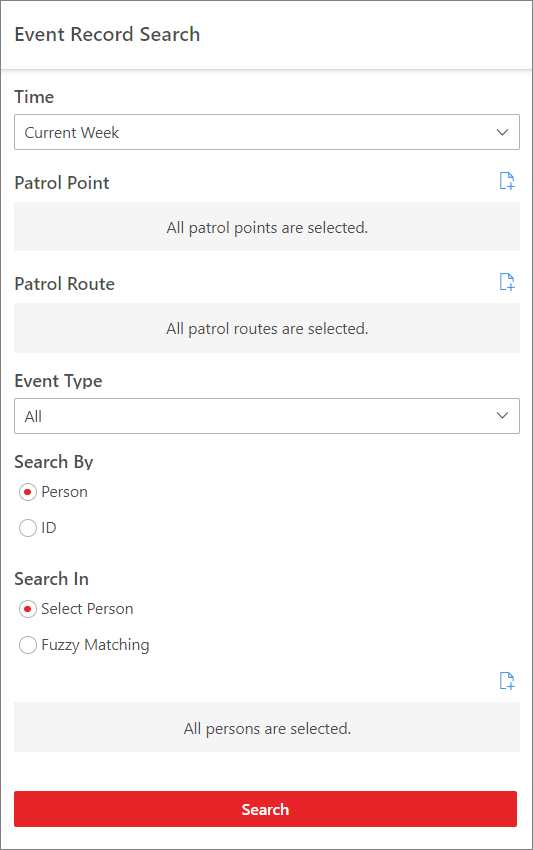 Figure 1 Event Record
Search
Figure 1 Event Record
Search -
Set the search conditions.
- Time
-
Select from Today, Yesterday, Current Week, Last 7 Days, and Last 30 Days, or set a custom time interval of no more than 31 days.
- Patrol Point
-
By default, all patrol points are selected. Click
 to select
certain patrol point(s) to filter the search results.
to select
certain patrol point(s) to filter the search results. - Patrol Route
-
By default, all patrol routes are selected. Click
to select
certain patrol route(s) to filter the search results. - Event Type
-
By default, all patrol-related event records will be searched. Select Patrol Event or Exception Reporting from the drop-down list to search for the specified type of event records only.
- Search By
-
Choose whether to search for the event records by Person or ID.
-
Search by person: In the Search In field, choose whether to search by person selections or fuzzy matching of persons' names.
-
Search by ID: Enter the card No. in the search box.
-
- Optional:
Perform the following operations according to your needs.
Option Description View Details of an Event Record
In the Operation column of an event record, click
 to view detailed
information about the record.
to view detailed
information about the record.-
For a patrol event, you can view the event information (e.g., patrol status), patrol information (e.g., patrol point, patrol route, shift schedule, scheduled/actual patrol time, and planned/actual patrol person) depending on the patrol status, and videos/pictures related to the patrol.
-
For an exception reporting, you can view the event information (e.g., exception type and description), patrol information (e.g., patrol point, patrol route, and patrol person), and the file(s) attached to this exception reporting.
Export an Event Record
In the Operation column of an event record, click
 to export the
record.
to export the
record.Export All Matched Event Records
On the top right of the result page, click Export to export all matched results. You can choose whether to export in XLSX format or CSV format, and whether to export the event records with picture.
-