Real-Time Patrol Monitoring
You can monitor the patrol status in real time via map or list, to conveniently know whether an exception occurs during the patrol, which helps handling the exception in time.
Make sure you have the operation permission for patrol monitoring.
On the top left of the Web Client, select  > Integrated Service > Patrol > Real-Time Monitoring. On the patrol monitoring page, you can view
the real-time status of patrol routes and information about real-time events related to
the patrols.
> Integrated Service > Patrol > Real-Time Monitoring. On the patrol monitoring page, you can view
the real-time status of patrol routes and information about real-time events related to
the patrols.
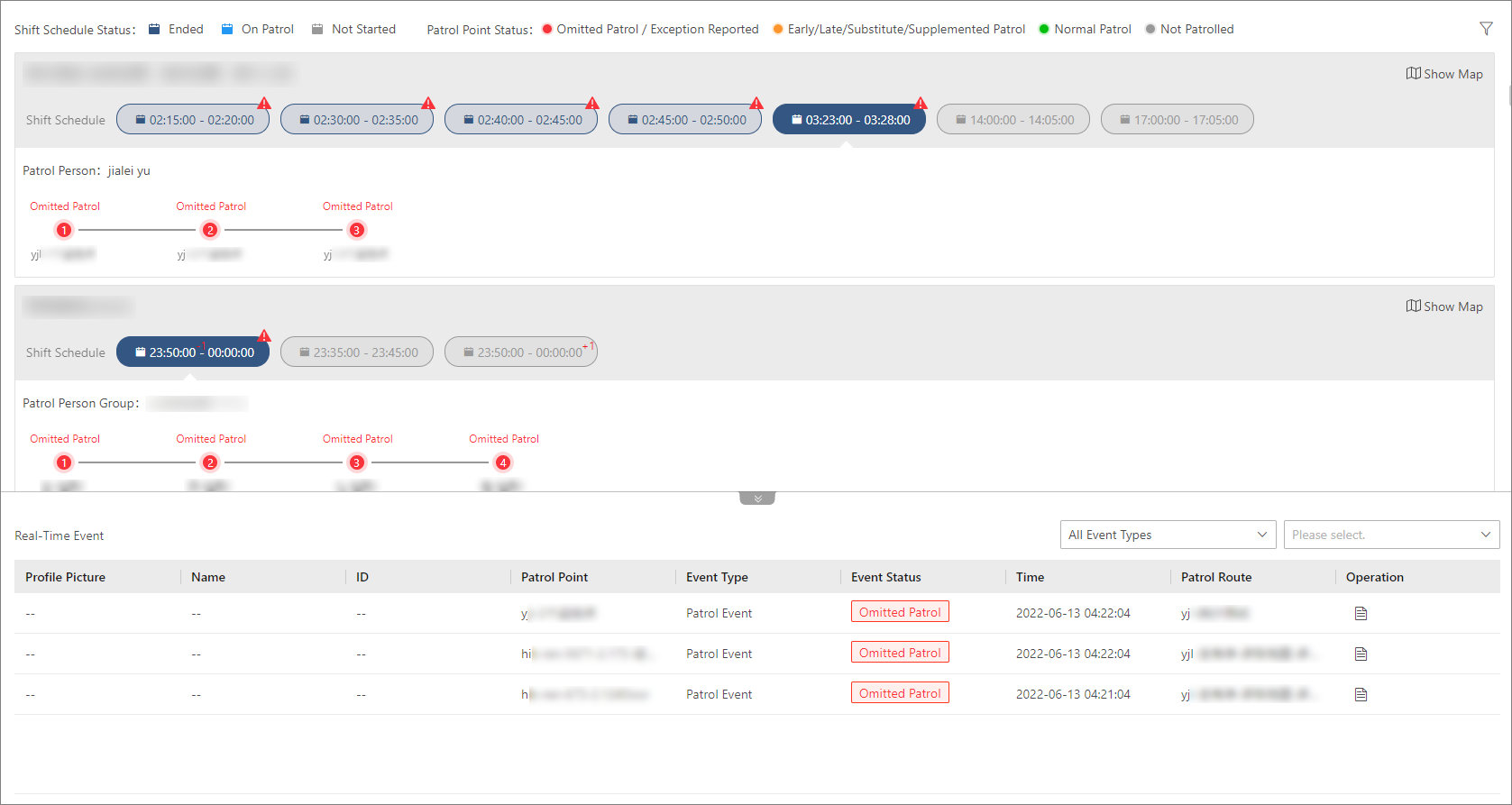 Figure 1 Real-Time Monitoring Page
Patrol Route Status
The real-time status of all enabled patrol routes with shifts scheduled
for the current day are displayed by default. You can filter the routes by clicking
 on the top right of the page and setting the filter
criteria (e.g., patrol route, patrol point, patrol person / patrol person group,
route status, event type, and time range).
on the top right of the page and setting the filter
criteria (e.g., patrol route, patrol point, patrol person / patrol person group,
route status, event type, and time range).
Information such as the route name, patrol person / patrol person group, scheduled time period for each shift, and a list of patrol points are displayed for each patrol route. The shift schedule status (e.g., ended, on patrol, and not started) and patrol point status (e.g., omitted patrol / exception reported, early patrol, late patrol, substitute patrol, supplemented patrol, normal patrol, and not patrolled) are indicated with different colors with respect to the legends on the top of the page.
You can click a patrol point already being patrolled to view its status and the related patrol event information. You can also hover over a shift to view its status and detailed information. If needed, you can manually start or postpone a shift not started yet by selecting the shift schedule and clicking Start Now or Postpone respectively.
For patrol routes with patrol points that have been added to maps, you can also click Show Map to switch to monitoring the patrol status in real time via maps.
Real-Time Event
The patrol monitoring page also supports showing information about real-time patrol-related events (e.g., patrol events and exception reporting), including the patrol person information (e.g., profile picture, name, ID), event information (e.g., event type, event status), patrol information (e.g., patrol point, patrol route, shift schedule, scheduled/actual patrol time, and planned/actual patrol person), and related video/picture files and attachments.
The actual information displayed may vary depending on the event type and patrol status.
You can filter the real-time events by event type and view details about each event
by clicking  in the Operation column.