You should configure the parameters of the sender's email account before
the system can send the message to the designated email account(s) as the email
linkage.
-
In the top-left corner of the Home page, select .
-
Select on the left.
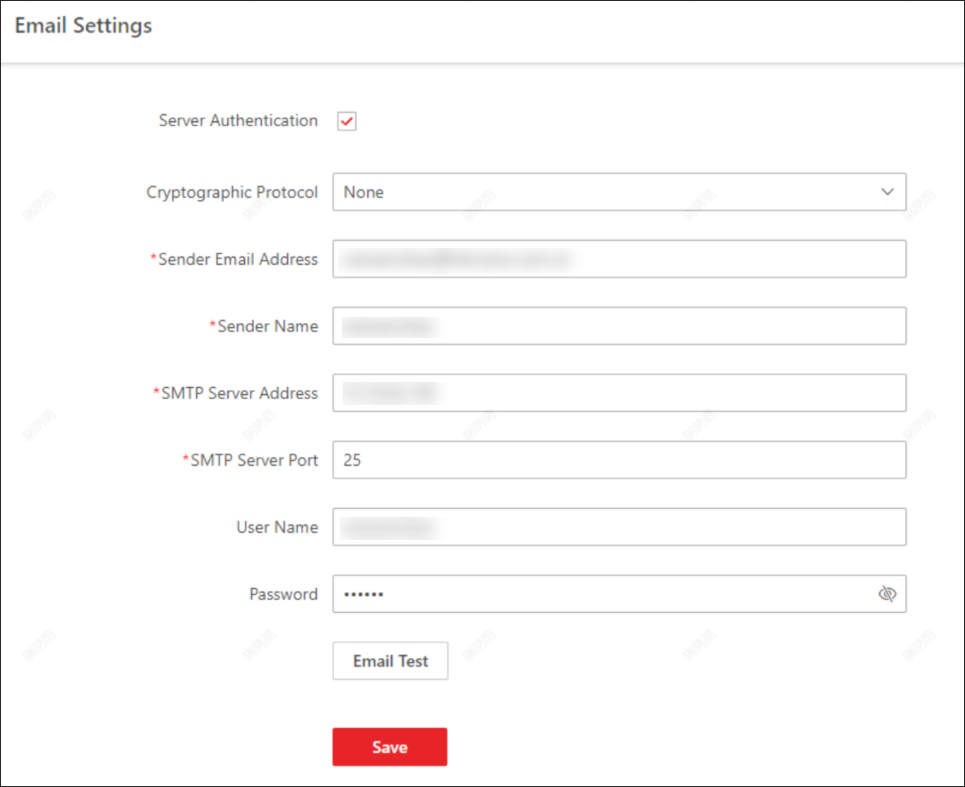 Figure 1 Email Settings
-
Configure the parameters according to actual needs.
- Server Authentication (Optional)
-
If your mail server requires authentication, check
this checkbox to use authentication to log in to this
server.
- Cryptographic Protocol
-
Select the cryptographic protocol of the email to
protect the email content if required by the SMTP server.
- Sender Email Address
-
Enter the email address of the sender to send the
message.
- Sender Name
-
Enter the sender name to send the message.
- SMTP Server Address
-
The SMTP server's IP address or host name (e.g.,
smtp.263xmail.com).
- SMTP Server Port
-
The default TCP/IP port used for SMTP is 25.
- User Name (Optional)
-
User name for authentication to log in to the
server. This parameter is valid and optional when server
authentication is enabled.
- Password (Optional)
-
Password for authentication to log in to the server.
This parameter is valid and optional when server authentication
is enabled.
-
Click Email Test to test whether the email settings work
or not.
The corresponding attention message box will pop up.
-
Click Save.
 > Basic Management > System.