Diagnose Remote Fault
When faults occur in HikCentral Professional, you can get the system information using the authentication code generated by HikCentral Professional to help diagnose the system faults.
In the top left corner
of Home page, select  > Basic Management > System.
Select on the left.
Switch on Remote Fault Diagnosis to generate an authentication code for remote diagnosis. It will be canceled automatically after 60 minutes.
The authentication code will be refreshed every time you switch on Remote Fault Diagnosis.
Launch Postman, create a new request, set the HTTP method to POST, and enter the request URL (format: http://<host>[:port]/ISAPI/Bumblebee/Platform/V1/TranckTaskInfo?&MT=GET).
Then in the Body area, enter the request message in JSON format (set the trackModuleNmae to the module name and set the AccessKey to the authentication code generated on HikCentral Professional), and click Send.
The response message is returned in the Body area of Response and it shows the system running information. You can perform fault diagnosis remotely according to the information.
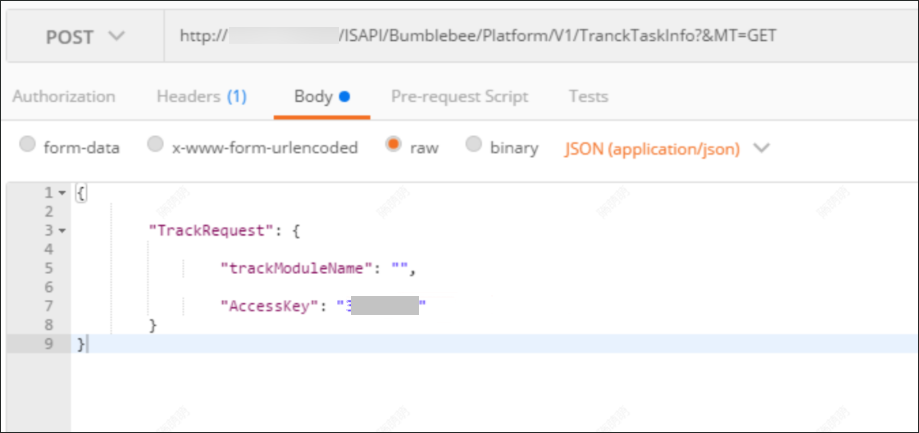 Figure 1 Get System Running Information
Using Postman
Figure 1 Get System Running Information
Using Postman