If the SYS server to be activated
can properly connect to the Internet, you can activate the SYS server in online mode.
-
Log in to HikCentral Professional via the Web
Client.
-
On the Home page, click Activate to open the Activate
License panel.
-
Click Online Activation to activate the License in
online mode.
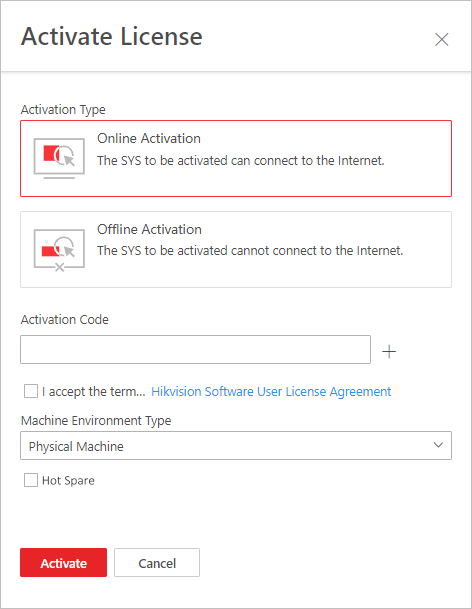 Figure 1 Activate License in
Online Mode
Figure 1 Activate License in
Online Mode
-
Enter the activation code received when you purchased your License.
Note:
-
If you have purchased more than one Licenses, you
can click  and enter other
activation codes.
and enter other
activation codes.
-
The activation code should contain 16 characters or
32 characters (except dashes).
-
Check I accept the terms of the agreement to open the
License Agreement panel and click OK.
- Optional:
Select the machine environment type.
- Physical Machine (Default)
-
A physical computer that contains hardware
specifications and is used for running the SYS. If the hardware changed,
the License will be invalid, and the SYS may not run normally.
- AWS (Amazon®
Web Services)
-
A virtual machine that provides the cloud computing
services
for running the SYS.
- Azure (Microsoft® Azure)
-
A virtual machine that provides the cloud computing
services
for running the SYS.
Note:
If you
select
the AWS or Azure as the machine environment type, the pStor server, Streaming
Server, and other external servers
cannot
access the platform. And the Rose hot spare system is also not
supported.
- Optional:
Check the Hot Spare, select type, and enter the IP
address if you want to build a hot spare system.
Note:
-
You must select Hot Spare mode when you install the
system.
-
For how to build the hot spare system, please
contact our technical support engineers.
-
Click Activate.
The email settings pane will appear after you
activated
the License.
-
Enter an email address for the admin user.
Note:
This email is used to receive the License activation code
when the admin user forgets the password for logging in to the platform
and the activation code at the same time.
-
Set the email server parameters. See details in Configure Email Account.
-
Click OK to save the email settings.