Add an Approval Role
Approval roles are for specifying reviewers and persons to be notified of review results. You can add approval roles and assign them to persons. Persons assigned with the approval role that is defined as the reviewer have the permission to approve/reject applications of specified departments / attendance groups / persons, and persons assigned with the approval role that is defined to be notified have the permission to receive and view review results.
Make sure the current admin user has the permissions for configuring approval roles. For details about user permissions, refer to Role and User Management.
-
On the top left, select
 > Integrated Service > Attendance.
-
Click
 to
open
the person selection pane.
to
open
the person selection pane.
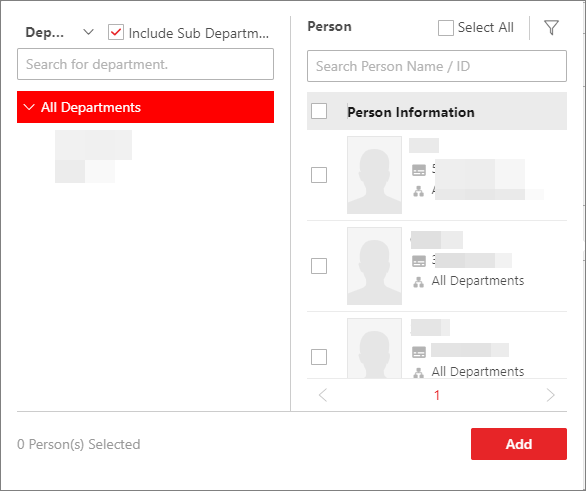 Figure 1 Select Person Pane
-
At the top of the left tree, click
 to select
Department or Attendance
Group to show all the selectable departments or
attendance groups.
Note:
to select
Department or Attendance
Group to show all the selectable departments or
attendance groups.
Note:If Department is selected, you can check Include Sub Department to display persons of sub-departments.
-
Check the person(s) select the person(s) to assign the approval role
to.
Note:
You can check Select All at the top of the right, or enter keywords to search for persons, or click
 to filter
persons by the position or additional information. For details
about customizing additional information items, refer to Customize Additional Information.
to filter
persons by the position or additional information. For details
about customizing additional information items, refer to Customize Additional Information.
-
At the top of the left tree, click
- Optional:
Perform the following operations as needed.
Option Description Edit Approval Role
Select an approval role in the list and click
 to edit it.
Delete Approval Role
-
Select one or multiple approval roles in the list and click Delete to delete the approval roles. Also, you can click Delete All to delete all approval roles.
-
Select an approval role from the list, and click
 to delete
it.
to delete
it.
Assign Approval Role to More Persons
Select an approval role in the list, and click Assign To on the right pane to select persons to assign the approval role to.
Unassign Approval Role
Select an approval role in the list, and select the person(s) on the right pane, and click Unassign to unassign the approval role for the selected person(s). Also, you can click Unassign All to unassign the approval role for all persons.
-