Edit a Fixed Code
Fixed code refers to the calculation rules of attendance types. You can set parameters of fixed codes such as the unit, symbol, and rounding rule.
On the top left,
select  > Integrated Service > Attendance.
Select on the left.
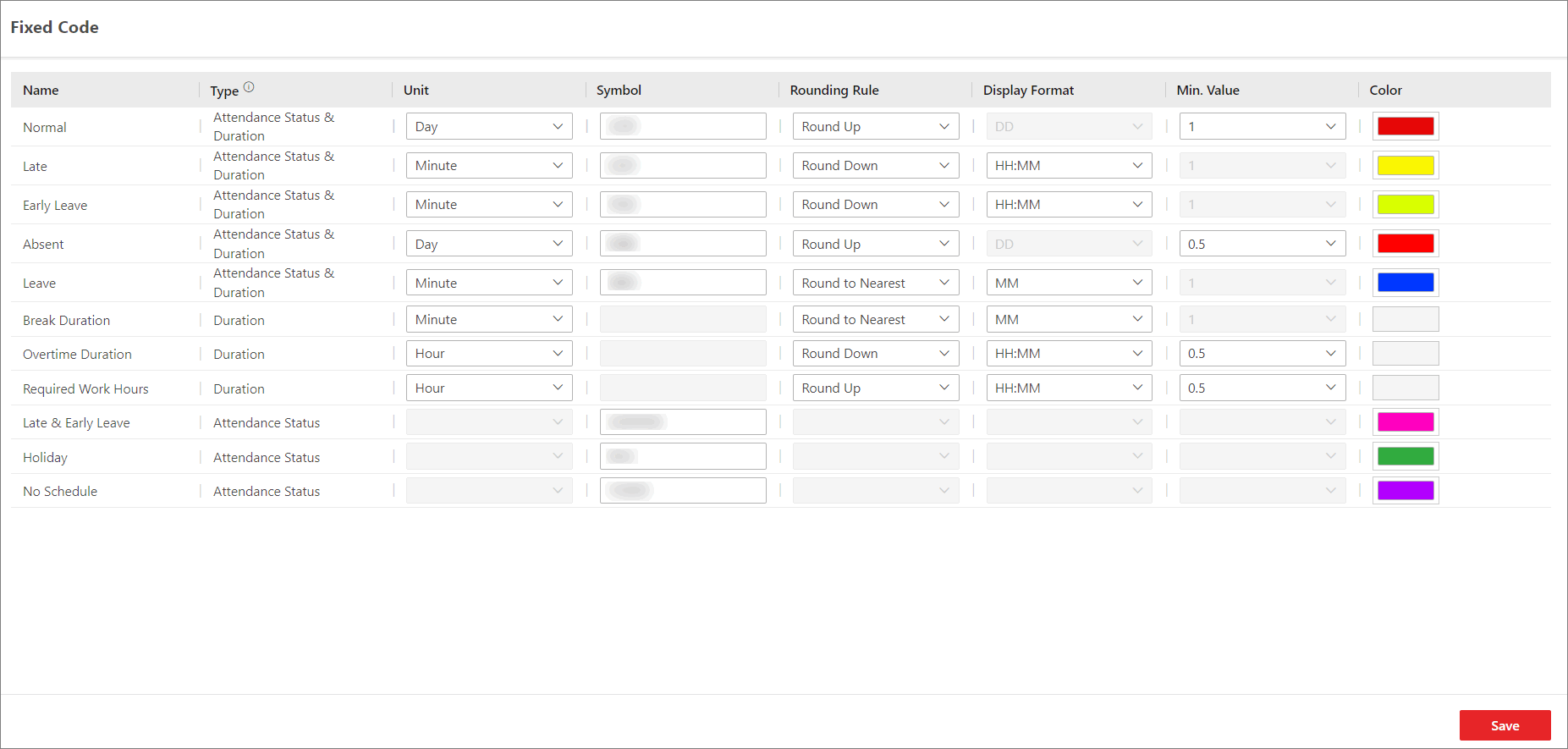 Figure 1 Edit Fixed Code
You can set the following parameters and click Save to finish editing.
- Unit
-
Unit of pay code. Select from minute, hour, and day.
- Symbol
-
Different symbols indicate different status respectively, including late, absent, no schedule, holiday, etc. You can customize these marks according to actual needs.
- Rounding Rule
-
Rule for calculating the attendance.
- Round Up
-
Round the number of pay code up, e.g., to make 0.5 go up, so 6.5 rounds up to 7.
- Round to Nearest
-
Round decimal numbers to nearest integers either by rounding up or rounding down based on the tenths places, e.g., 6.5 rounds to 7 and 6.4 rounds to 6.
- Round Down
-
Round the number of pay code down, e.g., to make 0.5 go down, so 6.5 rounds down to 6.
- Display Format
-
Time format of the fixed code, including HH:MM, DD, HH, and MM.
- Min. Value
-
The minimum value of the fixed code. Select from 1 and 0.5.
- Color
-
Used for making differences among fixed codes.