Set Warning Threshold for Streaming Media Usage
An alarm can be triggered if the Streaming Media's CPU usage and RAM usage reaches a predefined warning threshold and lasts for a predefined duration, or if the channel usage of Streaming Media reaches a predefined warning threshold. The related threshold value can be checked via the Control Client.
On the top, select  > Basic Management > Maintenance.
Select on the left.
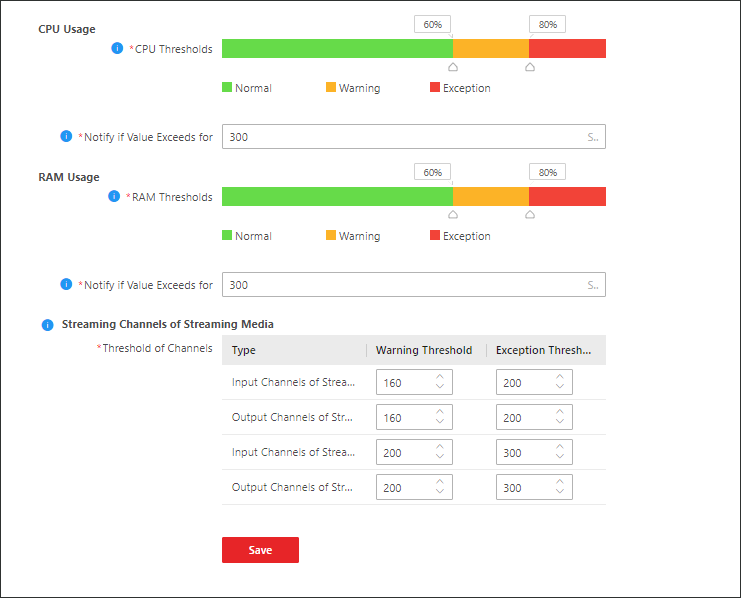 Figure 1 Set Server Usage Threshold
CPU/RAM Usage
Drag  to adjust the threshold value of CPU
or RAM usage, and then define the duration in the Notify if
Value Exceeds for (s) field.
to adjust the threshold value of CPU
or RAM usage, and then define the duration in the Notify if
Value Exceeds for (s) field.
-
If you set the Warning threshold value to 60%, and set 20 in the Notify if Value Exceeds for (s) field for the CPU usage, you can view the CPU usage reaching to the Waring threshold line in the status window of SYS on the Health Status Overview page when the CPU usage reaches 60% and lasts for 20 seconds.
-
If you set the Warning threshold value to 60%, set 20 in the Notify if Value Exceeds for (s) field for the CPU Usage, and set an alarm for CPU Warning (see Add Normal Event and Alarm), the alarm will be triggered when the CPU usage reaches 60% and lasts for 20 seconds.
Streaming Channels of Streaming Media
Enter a specific value in the text field or click  /
/ to adjust the threshold value for
the number of input or output channels of Streaming Media.
to adjust the threshold value for
the number of input or output channels of Streaming Media.
If you set the Warning threshold value to 160 for the number of input channels of Streaming Media, you can view the number of used input channels reaching to the Waring threshold line in the status window of SYS on the Health Status Overview page when the number of used input channels reaches 160.