SADP software is used for detecting the online device, activating the
device, and resetting its password.
Get the SADP software from the supplied disk or the official website, and install the
SADP according to the prompts.
-
Connect your video recorder power supply to an electrical outlet and turn on
it.
-
Run the SADP software to search the online recorders.
-
Check the recorder status from the device list, and select the inactive
recorder.
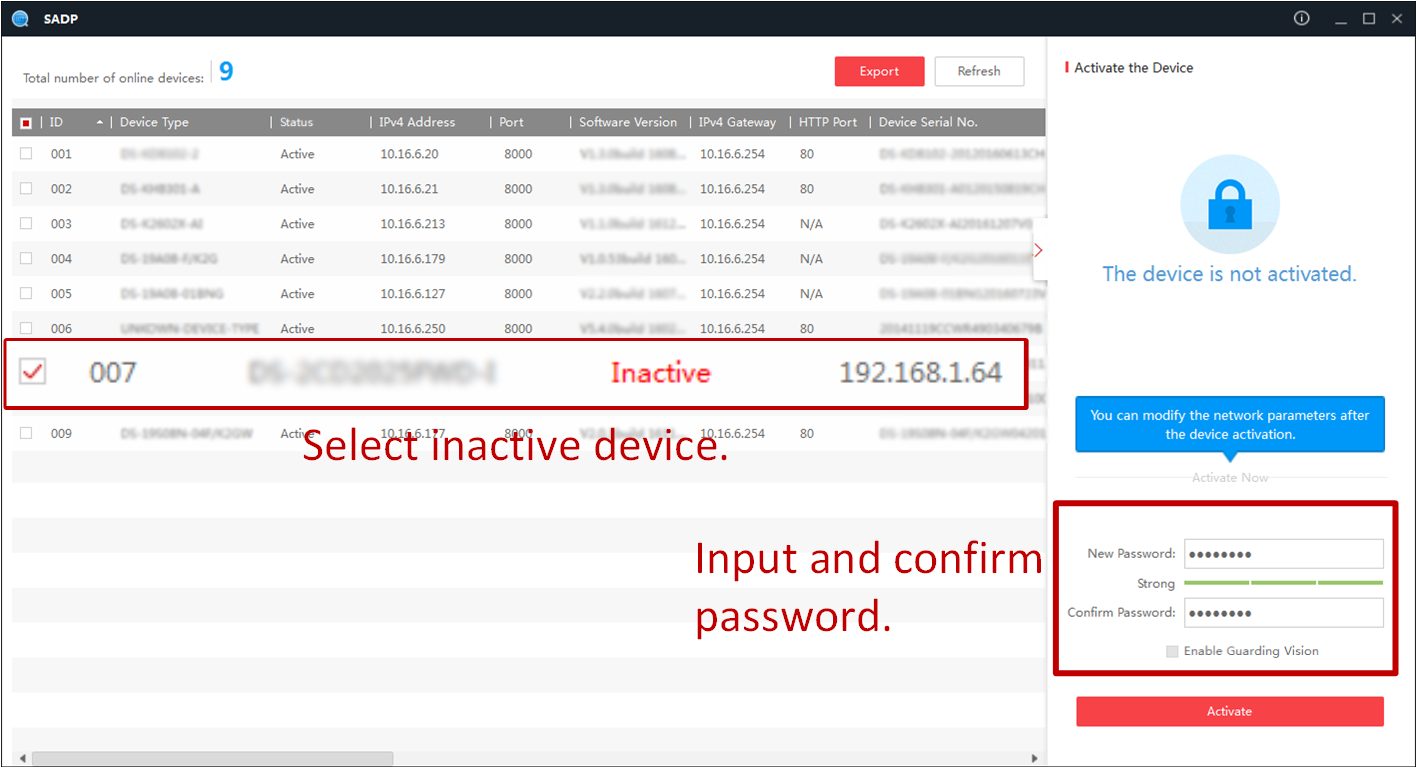 Figure 1 Activate via
SADP
Figure 1 Activate via
SADP
-
Create and input the new password in the password field, and confirm the
password.
Note:
We highly recommend you to create a strong password of your
own choosing (using a minimum of 8 characters, including at least three kinds of following
categories: upper case letters, lower case letters, numbers, and special characters) in
order to increase the security of your product. And we recommend you reset your password
regularly, especially in the high security system, resetting the password monthly or weekly
can better protect your product.
-
Click Activate.