Activate via Local Menu
For the first-time access, you have to set an admin password to activate your device. No operation is allowed before activation. You can also activate the device via web browser, SADP or client software.
-
Enter the admin password twice.
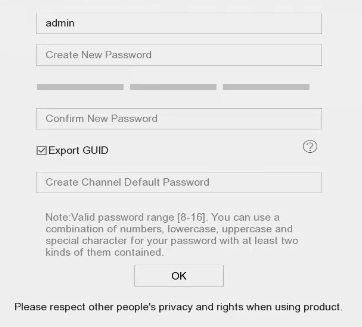 Figure 1 Activate via Local
MenuWarning:
Figure 1 Activate via Local
MenuWarning:We highly recommend you to create a strong password of your own choosing (using a minimum of 8 characters, including at least three kinds of following categories: upper case letters, lower case letters, numbers, and special characters) in order to increase the security of your product. And we recommend you reset your password regularly, especially in the high security system, resetting the password monthly or weekly can better protect your product.
Follow the wizard to set basic parameters.
-
There are methods to reset your password when you forget. You have to configure at least one password resetting method after activation.
-
For Hik-Connect configuration, refer to Configure Hik-Connect for details.