You can get access to the recorder via web browser. You may use one of the
following web browsers: Internet Explorer 6.0 and above, Apple Safari, Mozilla Firefox, and
Google Chrome. The supported resolutions include 1024 × 768 and above.
-
Enter the IP address in web browser, and then press
Enter. The default IP address is 192.168.1.64.
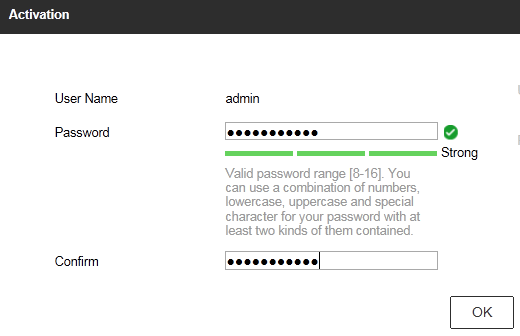
Figure 1 Web Browser
Activation
-
Set the password for the admin user account.
Note:
We highly recommend you to create a strong password of your
own choosing (using a minimum of 8 characters, including at least three kinds of following
categories: upper case letters, lower case letters, numbers, and special characters) in
order to increase the security of your product. And we recommend you reset your password
regularly, especially in the high security system, resetting the password monthly or weekly
can better protect your product.
-
Click OK.