For network cameras that are not using standard protocols, you can
configure customized protocols to add them. The system provides 8 customized
protocols.
-
Click
 on the main menu.
-
Go to .
Note: 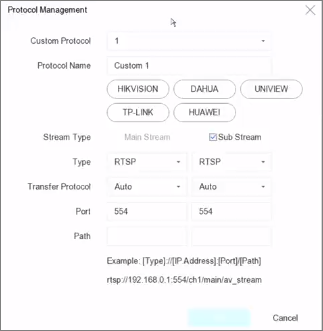
-
Set protocol parameters.
- Type
-
The network camera adopting custom protocol must
support getting stream through standard RTSP.
- Path
-
Contact the manufacturer of network camera for the
URL (Uniform Resource Locator) of getting main stream and
sub-stream.
Note:
The protocol type and the transfer protocol must be
supported by the network camera to add.
-
Click OK.
-
Click Custom Add to add cameras.
-
Set the parameters.
-
Click OK.