|
Face Liveness Level
|
After enabling face anti-spoofing function, you can set
the matching security level when performing live face
authentication.
|
|
Recognition Distance
|
Set the valid distance between the user and the camera when
authenticating.
|
|
Face Recognition Interval(s)
|
The time interval between two continuous face recognitions when
authenticating.
Note:
You can input the number from 1 to 10.
|
|
Face 1:N Security Level
|
Set the matching threshold when authenticating via 1:N matching mode.
The larger the value, the smaller the false accept rate and the
larger the false rejection rate.
|
|
Face 1:1 Security Level
|
Set the matching threshold when authenticating via 1:1 matching mode.
The larger the value, the smaller the false accept rate and the
larger the false rejection rate.
|
|
ECO Mode Settings
|
After enabling the ECO mode, the device will use the IR
camera to authenticate faces in the low light or dark environment.
And you can set the ECO mode threshold, ECO mode (1:N), ECO mode
(1:1).
- ECO Mode Threshold
-
When enabling the ECO mode, you can set the
ECO mode's threshold. The larger the value, the easier
the device entering the ECO mode.
- ECO Mode (1:1)
-
Set the matching threshold when
authenticating via ECO mode 1:1 matching mode. The
larger the value, the smaller the false accept rate and
the larger the false rejection rate.
- ECO Mode (1:N)
-
Set the matching threshold when
authenticating via ECO mode 1:N matching mode. The
larger the value, the smaller the false accept rate and
the larger the false rejection rate
|
|
Mask Settings
|
After enabling the mask detection function, the system
will recognize the captured face with mask picture. You can set
Face with Mask & Face (1:1),
Face with Mask & Face (1:N),
ECO (1:1) Threshold, ECO Mode
(1:N) Threshold, and Prompt
Method.
- Face with Mask & Face (1:1)
-
Set the matching value when authenticating
with face mask via 1:1 matching mode. The larger the
value, the smaller the false accept rate and the larger
the false rejection rate.
- Face with Mask & Face (1:N)
-
Set the matching value when authenticating
with face mask via 1:N matching mode. The larger the
value, the smaller the false accept rate and the larger
the false rejection rate.
- ECO Mode (1:1) Threshold
-
Set the matching value when authenticating
with face mask via ECO mode 1:1 matching mode. The
larger the value, the smaller the false accept rate and
the larger the false rejection rate.
- ECO Mode (1:N) Threshold
-
Set the matching value when authenticating
with face mask via ECO mode 1:N matching mode. The
larger the value, the smaller the false accept rate and
the larger the false rejection rate.
- Prompt Method
-
Set the None,
Reminder of Wearing and
Must Wear strategy.
- Reminder of Wearing
-
If the person do not wear a face
mask when authenticating, the device prompts a
notification and the door will open.
- Must Wear
-
If the person do not wear a face
mask when authenticating, the device prompts a
notification and the door keeps closed.
- None
-
If the person do not wear a face
mask when authenticating, the device will not
prompt a notification.
|
|
Multiple Faces Authentication
|
After multiple faces authentication is enabled, multiple
faces authentication is supported.
|
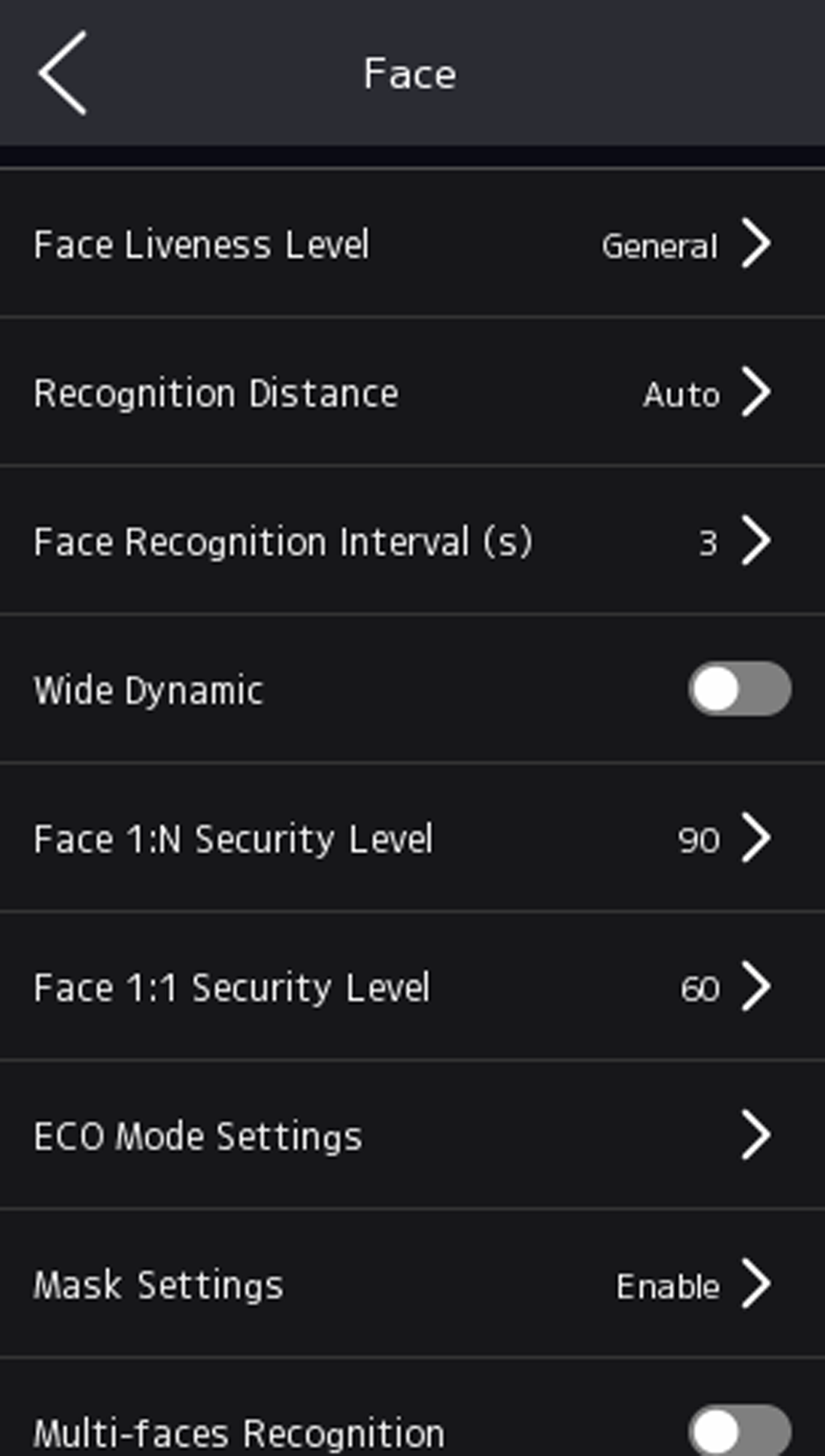 Figure 1 Biometric Parameters Page