Configure Patrol
A patrol is a scanning track specified by a group of user-defined presets (including virtual presets), with the scanning speed between two presets and the dwell time of the preset separately programmable.
Two or more presets for one PTZ camera need to be added. Refer to Configure Preset for details about adding a preset.
-
In the top left corner of the Client, select
 > All Modules > Video > Video Application > Video Application.
-
Click
 to enter the PTZ Control
mode.
to enter the PTZ Control
mode.
- Optional:
You can click
 to get device PTZ
configuration.
to get device PTZ
configuration.
-
Click
 to enter the PTZ patrol
configuration panel.
to enter the PTZ patrol
configuration panel.
-
Add presets to the patrol.
-
Click
 on
the right side of a patrol.
on
the right side of a patrol.
-
Click
 to
add a configured preset, and set the dwell time and patrol speed.
Note:
to
add a configured preset, and set the dwell time and patrol speed.
Note:-
The preset dwell time ranges from 15 to 30s.
-
The patrol speed ranges from 1 to 40.
-
The unconfigured patrol is gray.
-
The configured patrol is highlighted.
-
-
Repeat the above steps to add other presets to the patrol.
Note:
By default, the first preset is added to the patrol list. Double-click the preset, speed, and dwell time to access a drop-down configuration list.
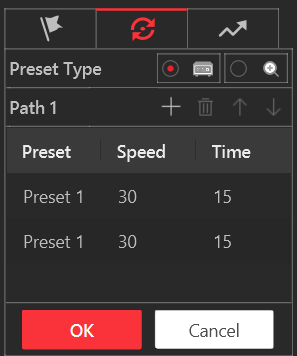 Figure 1 Configure
Patrol
Figure 1 Configure
Patrol
-
Click
- Optional:
Perform the following operations after you add the preset.
Option Description Edit Added Preset
Double-click the corresponding field of the preset to edit the settings.
Remove Preset from Patrol
Click
 to remove the preset from the patrol.
Adjust Preset Sequence
Click
 or
or  to adjust the presets sequence.
 - Optional:
After setting the patrol, you can do one or more of the followings:
Option Description Call Patrol
Click
 to start the patrol.Note:
When the patrol is working, it will stop if you start performing PTZ control including direction button control, zoom in/out, focus +/-, iris +/-, etc. The patrol will continue working after you have stopped PTZ control for 15 seconds.
Stop Calling Patrol
Click
 to stop the patrol.