Access Control Overview
On the Access Control Overview page, you can view the system data, health status, person credential status, etc.
In the upper-left corner of the Home page, select  > Passing Management > Access Control.
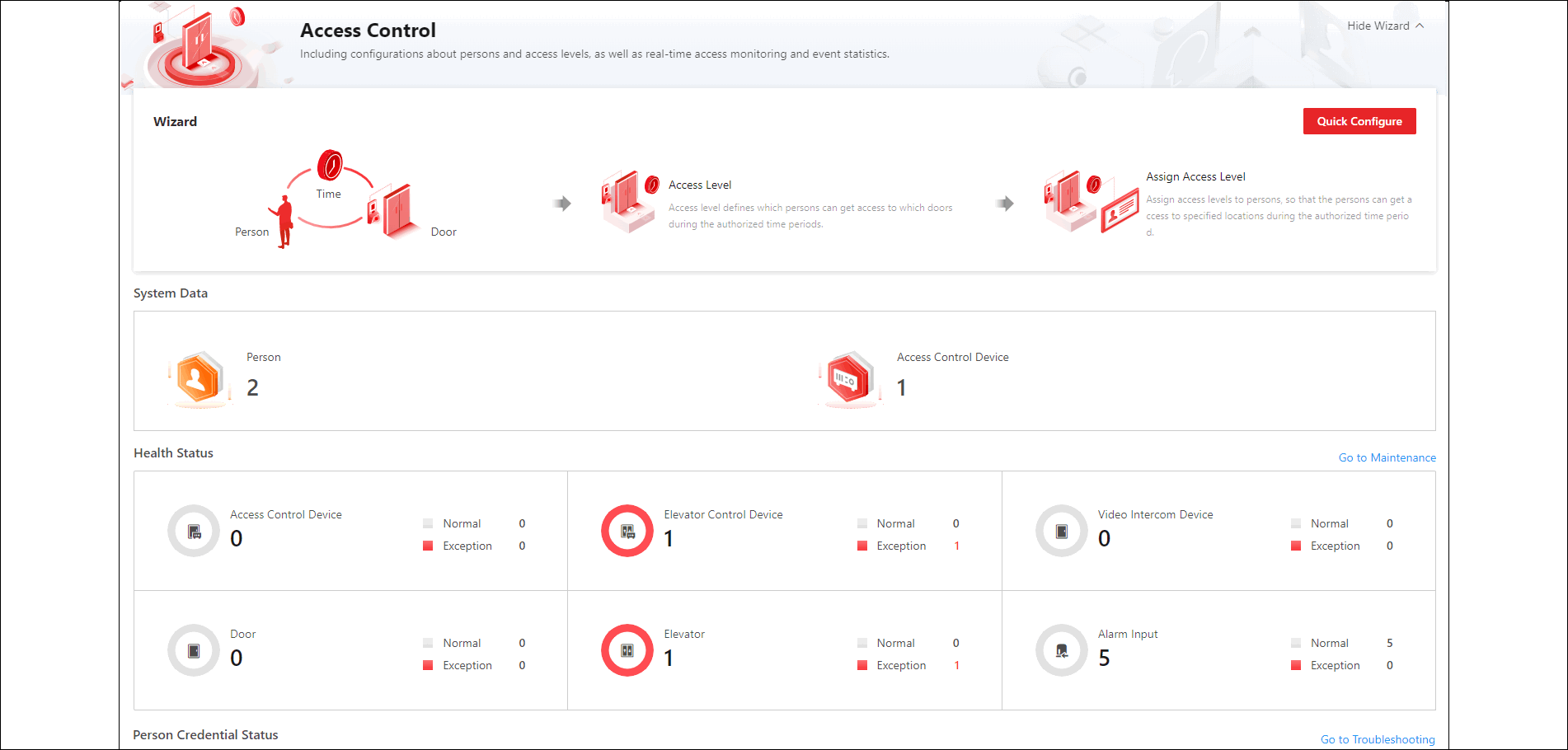 Figure 1 Access Control Overview
Perform the following operations as needed.
|
Operation |
Description |
|---|---|
|
Guide |
You can view the brief introduction of the Access
Control function and the major steps of configuration, including
adding door, adding person, setting time period for entry and exit,
managing access level, and assigning access level. You can hover the
mouse cursor over each step and click |
|
View System Data |
In System Data, click the number under person or device to go to the Person Management page or Device page. |
|
View Resource Status |
In Health Status, click the number under the resource type or the number besides Abnormal to go to the Maintenance page to view details of resources status or alarm input. |
|
Go to Maintenance |
In the upper-right corner, click Go to Maintenance to enter the Maintenance module. For more about the Maintenance module, refer to Maintenance. |
|
View Person Credential Status |
Click the number of credential not configured to go to the person management page. You can also view the number of each applied credential, and the application status of access levels. |
|
Filter Access Event Statistics |
Click |
|
Export Access Event Statistics |
Hover over |
 to go to the
corresponding page; you can also click
to go to the
corresponding page; you can also click  and select a period
to view the statistics of this period.
and select a period
to view the statistics of this period. , select a file
format, and click
, select a file
format, and click