Add Generic Event
A generic event is a signal transferred in the form of TCP/UDP/HTTP/HTTPS data package from the resource (e.g., external systems and devices) if something occurred and matched the configured expression. In this way, you can easily integrate the platform with a very wide range of external sources, such as access control systems and alarm systems.
-
In the top left corner of Home page, select
 > Security Monitoring > Event and Alarm.
-
Click Add to enter the Add Generic Event page.
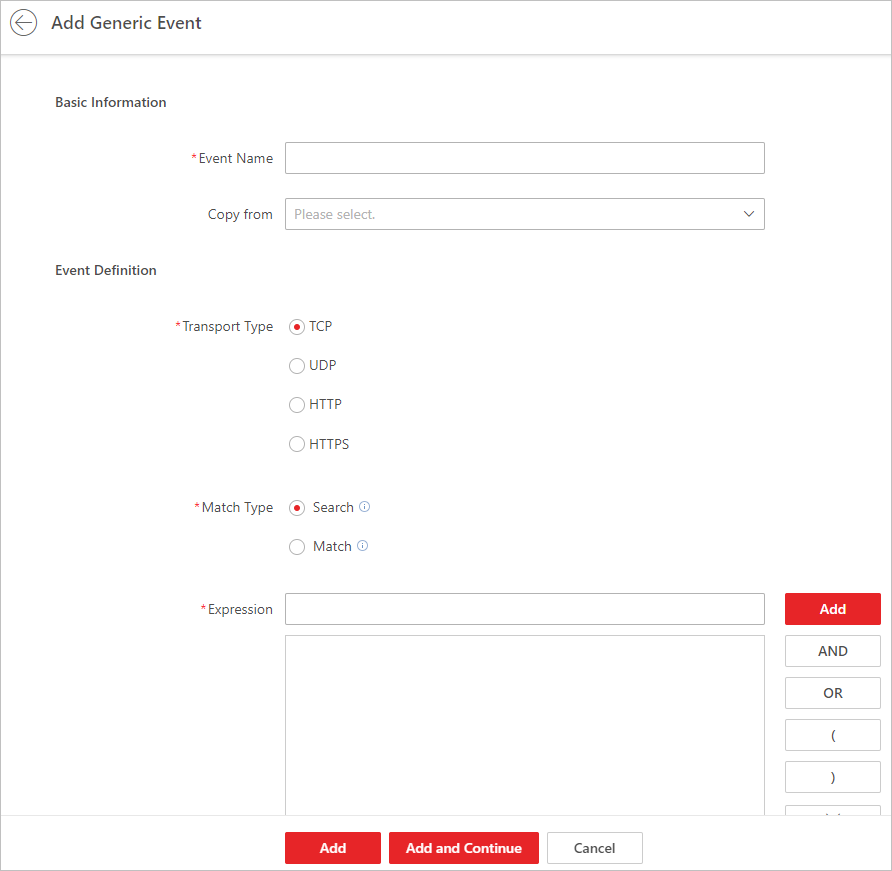 Figure 1 Add Generic Event
Page
Figure 1 Add Generic Event
Page -
Define the expression for analyzing the received package.
- Optional:
Click
 to remove the item at
the left of the cursor from the expression.
Note:
to remove the item at
the left of the cursor from the expression.
Note:You can position the cursor inside the expression in order to determine where a new item should be included or where an item should be removed.
The parenthesis or operator buttons are described in the following:
- AND
-
You specify that the terms on both sides of the AND operator must be included.
For example, if you define the rule as 'Motion' AND 'Line Crossing' AND 'Intrusion', the term Motion, and Line Crossing as well as the term Intrusion must be all contained in the received package for the conditions to be met.
Note:In generally, the more terms you combine with AND, the fewer events will be detected.
- OR
-
You specify that any term should be contained.
For example, if you define the rule as 'Motion' OR 'Line Crossing' OR 'Intrusion', any of the terms (Motion, Line Crossing, or Intrusion) must be contained in the received package for the conditions to be met.Note:In generally, the more terms you combine with OR, the more events will be detected.
- (
-
Add the left parenthesis to the rule. Parentheses can be used to ensure that related terms are processed together as a unit; in other words, they can be used to force a certain processing order in the analysis.
For example, if you define the rule as ('Motion' OR 'Line Crossing') AND 'Intrusion', the two terms inside the parentheses will be processed first, then the result will be combined with the last part of the rule. In other words, the system will first search any packages containing either of the terms Motion or Line Crossing, then it searches the results to look for the packages that contain the term Intrusion.
- Optional:
Click