Health Monitoring Service: Better Maintenance for Your Customers
For the United Kingdom and Ireland, the health monitoring service is replaced by Remote Maintenance Pro Service: Better Maintenance for Your Customers.
Pain Points and What Customers Want From Installers
|
Pain Points of Customers & Installers |
What Customers Want from Installers |
|---|---|
|
Customers:
Installers:
|
|
What You Can Sell & Offer to Your Customers
Hik-Partner Pro offers a free package containing a suite of features such as device online/offline status. In some cases, these free features are insufficient for you to satisfy higher level needs of your customers. Compared with the free package, the health monitoring package offers much more as follows.
|
Functionality |
Free Package |
Health Monitoring Package |
|---|---|---|
|
Site and Customer Management |
Supported |
Supported |
|
Site Map |
Supported |
Supported |
|
Add Devices to Hik-Partner Pro |
Supported Capacity: 1024 Devices |
Supported Capacity: Unlimited Devices |
|
On-Site Config |
Supported |
Supported |
|
On-Site Batch Upgrade |
Supported |
Supported |
|
Device Status |
Supported |
Supported |
|
Batch Arm and Disarm Alarm Devices |
Supported |
Supported |
|
Employee Account |
Supported Unlimited Number of Employee Accounts Employee accounts with permission to manage devices shall be purchased additionally. |
Supported Unlimited Number of Employee Accounts Employee accounts with permission to manage devices shall be purchased additionally. |
|
Maintenance Quotation |
Supported Capacity: 3 Maintenance Quotations |
Supported Capacity: Unlimited Maintenance Quotations |
|
Remote Configuration |
Supported |
Supported |
|
Remote Live View, Playback, and Video Download |
Supported |
Supported |
|
Remote Device Upgrade |
Supported |
Supported |
|
Remote Batch Upgrade |
Supported |
Supported |
|
Real-Time Health Monitoring |
NOT Supported |
Supported |
|
Device Exception Notification |
NOT Supported |
Supported |
|
Exception Handling |
NOT Supported |
Supported |
|
Scheduled Health Check Reports |
NOT Supported |
Supported |
|
Linkage Rule |
NOT Supported |
Supported |
Step 1: Get Health Monitoring Packages
You can purchase the health monitoring packages online in the Service Market in Hik-Partner Pro, or purchase a service key from the local distributor first and then activate by the service key to get the purchased service packages.
The supported purchase methods vary depending on your country/region. Contact the local distributor for details.
Purchase Online Using the Portal
-
Go to .
-
In the Health Monitoring Package area, click Online Purchase to enter the Purchase Health Monitoring Package page.
-
Select the package based on the number of devices requiring proactive health monitoring, and click Purchase.
-
Select the effective duration.
-
Enter the distributor invitation code and the code from Hikvision sales.
NoteBy entering the codes when you purchase services online, you may get some discounts and the distributor/reseller can earn some rebates. For details, refer to How to Earn Commissions as a Distributor/Reseller.
-
Enter your VAT number. The VAT number will be displayed in the payment receipt.
-
Select Credit/Debit Cards as the payment method.
-
Click Checkout to enter the payment page and finish the payment.
Purchase Online Using the Mobile Client
-
Go to .
-
In the Health Monitoring Service area, tap Buy Now.
-
Select the package based on the number of devices requiring proactive health monitoring, and tap Purchase.
-
Select the effective duration.
-
Enter the distributor invitation code and the code from Hikvision sales.
NoteBy entering the codes when you purchase services online, you may get some discounts and the distributor/reseller can earn some rebates. For details, refer to How to Earn Commissions as a Distributor/Reseller.
-
Tap Payment Agreement at the bottom to read the agreement and check Before paying, please agree to Payment Agreement if you agree with the terms.
-
Tap Checkout to enter the payment page and finish the payment.
Get Packages by Service Key Using the Portal
-
Contact your local distributor and purchase a service key from them.
-
Go to .
-
In the Health Monitoring Package area, click Activate by Service Key.
-
In the Service Key field, enter the service key.
-
Click OK.
Get Packages by Service Key Using the Mobile Client
-
Contact your local distributor and purchase a service key from them.
-
Go to .
-
In the Health Monitoring Service area, tap Activate by Service Key.
-
In the Service Key field, enter the service key.
-
Tap OK.
Step 2: Activate Health Monitoring Service for Customers' Devices
After you get the health monitoring package, you can activate the health monitoring service for any types of devices, as long as the number of devices is within your current package's limit. Once the service is activated, features such as device health monitoring and device exception notifications will be available for these devices.
Activate the Service for Devices Using the Portal
-
Go to . Toggle on the switch in the Operation column to activate for one device, or select multiple devices and click Batch Activate Health Monitoring Service for Devices.
-
Go to , find the device, hover the cursor onto on the device card, and then click Activate Service.
-
When you add devices successfully, on the adding result page, click Activate Service.
 on the device card,
and then click
on the device card,
and then click -
If the firmware version of a device is obsolete, or its device type cannot be recognized by Hik-Partner Pro, activating health monitoring service for the device is not supported.
-
If the number of devices with activated health monitoring service reached the package's limit, you can click Upgrade Service to upgrade to a package of higher device capacity.
Activate the Service for Devices Using the Mobile Client
-
Go to , and tap Detail in the Health Monitoring section. Tap Activate Service, and select devices to activate the service.
-
Tap Site, tap a site, tap a device, and tap Health Monitoring Service to activate the service for it.
-
When you add devices successfully, on the adding result page, tap Activate Service.
-
If the firmware version of a device is obsolete, or its device type cannot be recognized by Hik-Partner Pro, activating health monitoring service for the device is not supported.
-
If the number of devices with activated health monitoring service reached the package's limit, you can tap Upgrade Service to upgrade to a package of higher device capacity.
Step 3: Manage Health Monitoring Packages
Manage Health Monitoring Service Using the Portal
Go to .
Package
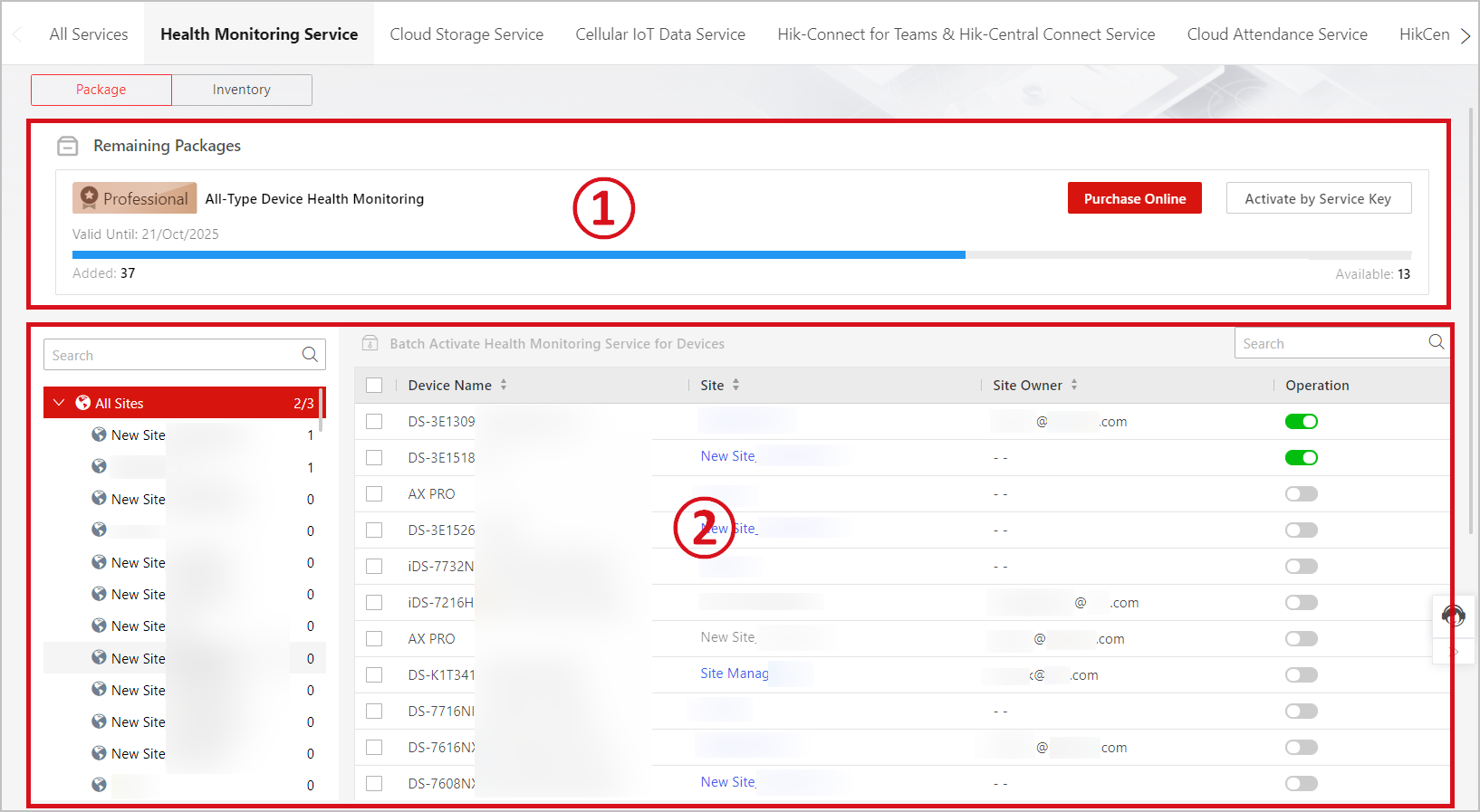
On this page, you can manage your premium, professional, and expert packages.
|
Area No. |
Operation |
Description |
|---|---|---|
|
1 |
View Remaining Packages & Purchase More |
You can check the current number of devices for which the health monitoring service is activated, and the remaining number of devices for which the service can still be activated. Click Activate by Service Key or Online Purchase to get more packages. |
|
2 |
Activate Service |
Toggle on the switch in the Operation column to activate the service for the device. Or select multiple devices, and then click Batch Activate Health Monitoring Service for Devices. |
Inventory
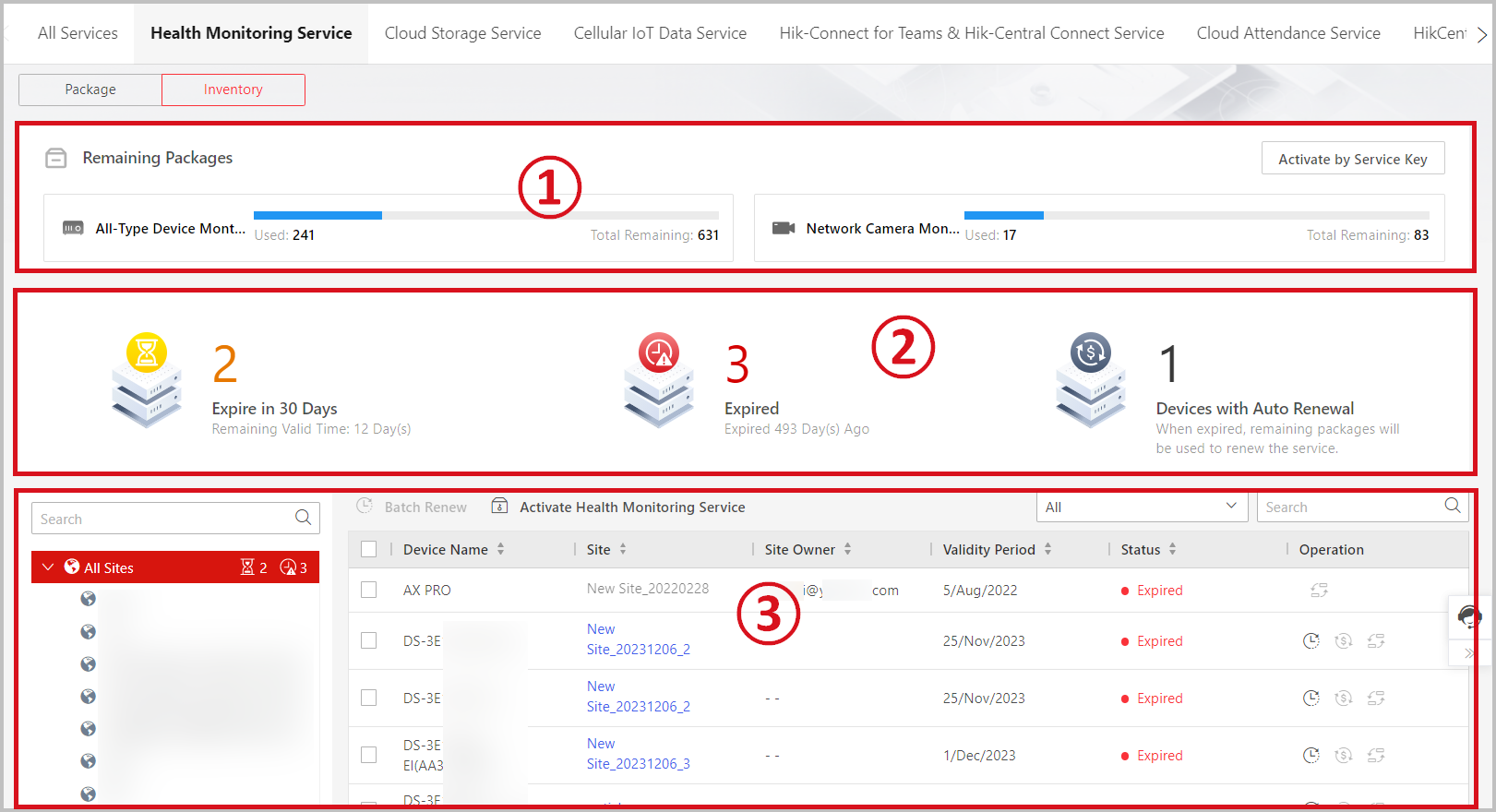
On this page, you can manage your remaining all-type device monthly/annual packages, and network camera monthly/annual packages. If you do not have these remaining packages, this page will not be available to you.
|
Area No. |
Operation |
Description |
|---|---|---|
|
1 |
View Remaining Packages & Purchase More |
View the used number and remaining numbers of each type of heath monitoring packages. Click Activate by Service Key to get more all-type device monthly/annual packages, and network camera monthly/annual packages. |
|
2 |
View Expiration and Auto Renewal Information |
View numbers of devices whose services are expiring in 30 days, expired, and with enabled auto renewal. |
|
3 |
Activate Service |
Click Activate Health Monitoring Service to activate the service for selected devices. |
|
3 |
Renew Service |
Select devices and then click Batch Renew, or click in the Operation column. |
|
3 |
Transfer Service |
Click in the Operation column to transfer the remaining service time from the current device to another. |
|
3 |
Enable Service Auto Renewal |
Click in the Operation column, switch on Auto Renewal, and then select a type of service packages for auto renewing the service. |
 in the
Operation column.
in the
Operation column. in the
Operation column to transfer the remaining service time
from the current device to another.
in the
Operation column to transfer the remaining service time
from the current device to another. in the
Operation column, switch on
in the
Operation column, switch on Manage Health Monitoring Service Using the Mobile Client
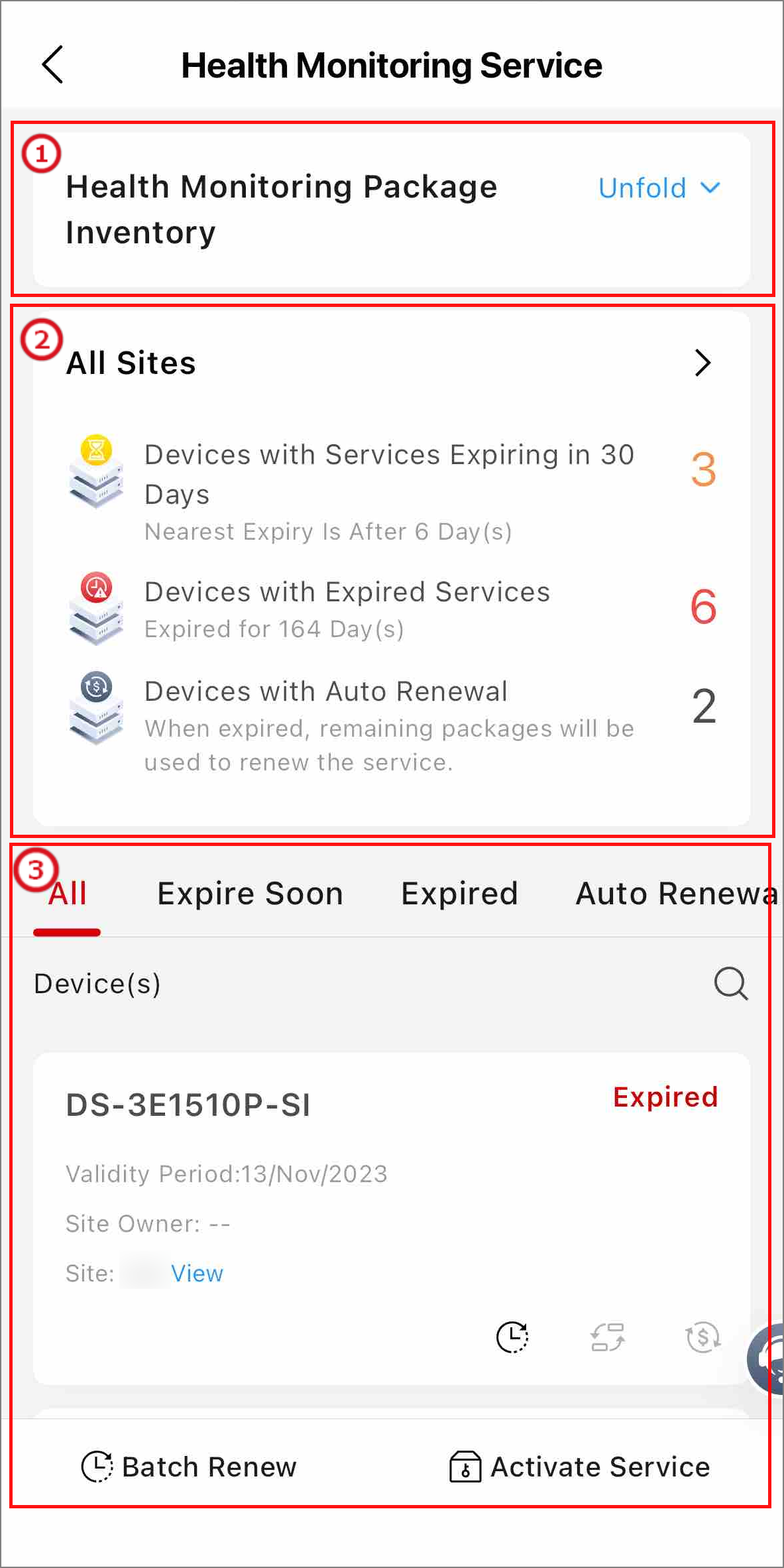
Tap Me at the bottom right, tap My Service, and tap Detail in the Health Monitoring Service section.
|
Area No. |
Operation |
Description |
|---|---|---|
|
1 |
View Remaining Packages & Purchase More |
Check the usage details of your health monitoring packages. Tap Activate by Service Key or Buy Now to get more packages. |
|
2 |
View Expiration and Auto Renewal Information |
View numbers of devices whose services are expiring in 30 days, expired, and with enabled auto renewal. |
|
3 |
Activate Service |
Tap Activate Service, and select multiple devices to activate. |
|
3 |
Renew Service |
Tap Batch Renew, and select devices to renew. Or tap on the device card. |
|
3 |
Transfer Service |
Tap on the device card to transfer the remaining service time from the current device to another. |
|
3 |
Enable Service Auto Renewal |
Tap on the device card, and select a type of service packages for auto renewing the health monitoring service. |