How to Earn Commissions as a Distributor/Reseller
For distributors/resellers, they can earn commissions from successfully promoting value-added services of Hik-Partner Pro to their customers (e.g., installers). For installers, they can also get some discounts on purchasing the services. Here we will introduce the process and the calculation method of earning commissions.
This function is only available to some users in some countries/regions. For details, please contact Hikvision.
Example: Distributor/Resellers Earn Commissions
-
Here we suppose that the price for 8 channels of 7-day annual event cloud storage is 360 EUR, which is only for reference. The actual prices on your page shall prevail.
-
The discount for installers is not shown in the figure below.
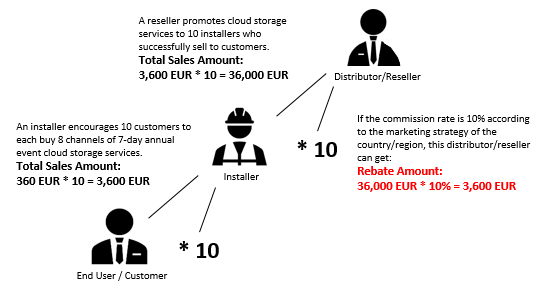
The Process of Earning Commissions
-
The distributor/reseller introduces and promotes the value-added services to installers when selling Hikvision devices.
Value-added services include the health monitoring service, remote maintenance service, cloud storage service, cloud attendance service, employee account add-on, co-branding, cellular IoT data service, etc. The actual supported value-added services may vary according to your country/region.
-
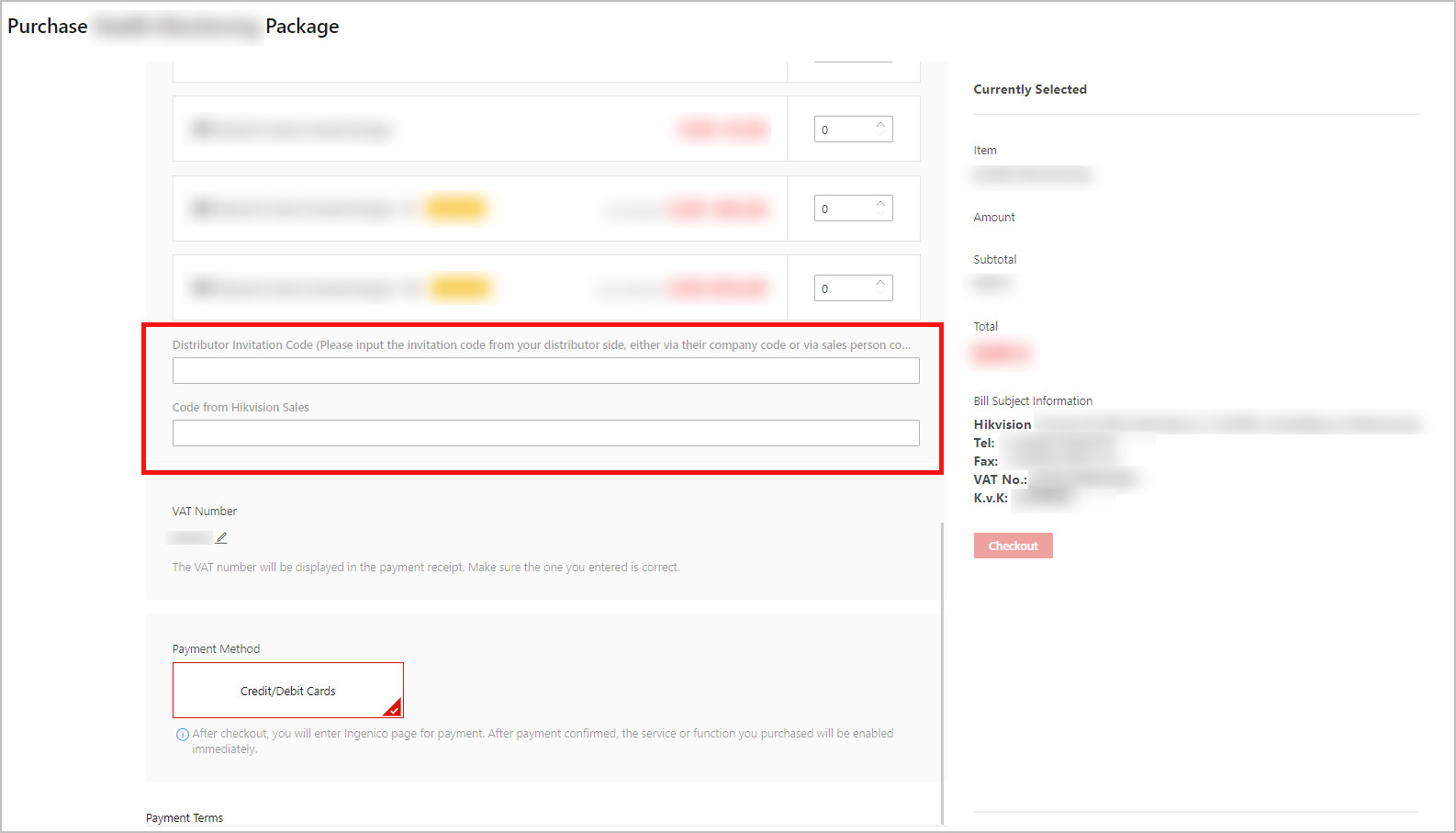
The installer purchases services online via Hik-Partner Pro Portal / Mobile Client, and enters the Distributor Invitation Code (required for getting commissions) and the Code from Hikvision Sales (optional, and only for tracking sales performance).
NoteFor distributors/resellers, you can get your Distributor Invitation Code via the Invite Friends task in the Rewards Store, and then ask the installer to enter it on the page of online purchase. The Code from Hikvision Sales can be any string created and given by the salesperson as long as it can represent this sales person for tracking their sales performance.
NoteEntering distributor invitation code is also supported on the Mobile Client. Due to UI similarity, here we only show the screenshot of the Portal.
Figure 2 Enter Distributor Invitation Code Using the Portal -
Hik-Partner Pro calculates the monthly commission amount based on the total sales amount of the distributor/reseller in the last month.
NoteThe distributor/reseller can go to the Portal, and click to view the calculation rules. Refer to The Way to Calculate Commission Amount for details.
-
The distributor/reseller gets the commission amount in the form of a credit note.
NoteThe distributor/reseller can go to the Portal, and click to view information about the commissions they have earned. See View Commission Details Using the Portal for details.
The Way to Calculate Commission Amount
Go to the Hik-Partner Pro Portal, click to view the calculation rules such as the commission rate.
Elements that Determine the Commission Amount
-
Total Sales Amount
The total sales amount of the orders linked to you via your distributor invitation code.
-
Commission Rate
The commission rate depends on the marketing strategy of the country/region.
Formula for Calculating the Commission Amount
Total Sales Amount in Previous Month × Commission Rate = Commission Amount for Previous Month
The platform will calculate the commission amount of the previous month on a fixed day of each month.
View Commission Details Using the Portal
After distributors/resellers promote the value-added services to their customers (e.g., installers), they will earn a certain commission amount and they can view the details of their commissions.
You can view the commissions of the current month after the calculation day of the next month. For example, if the calculation day is set to the 15th of each month, you can view the commissions of July on August 16th.
Go to .
