Forgot Password
If you forget the password of your account, you can reset the password.
-
Make sure the normal user has been configured with an available email address.
-
Make sure the email server is tested successfully.
-
Enter the required information on the Reset Password window.
-
If you are the admin user whose account is configured with security questions, you can select and answer the corresponding questions, click Next, and set and confirm your new password.
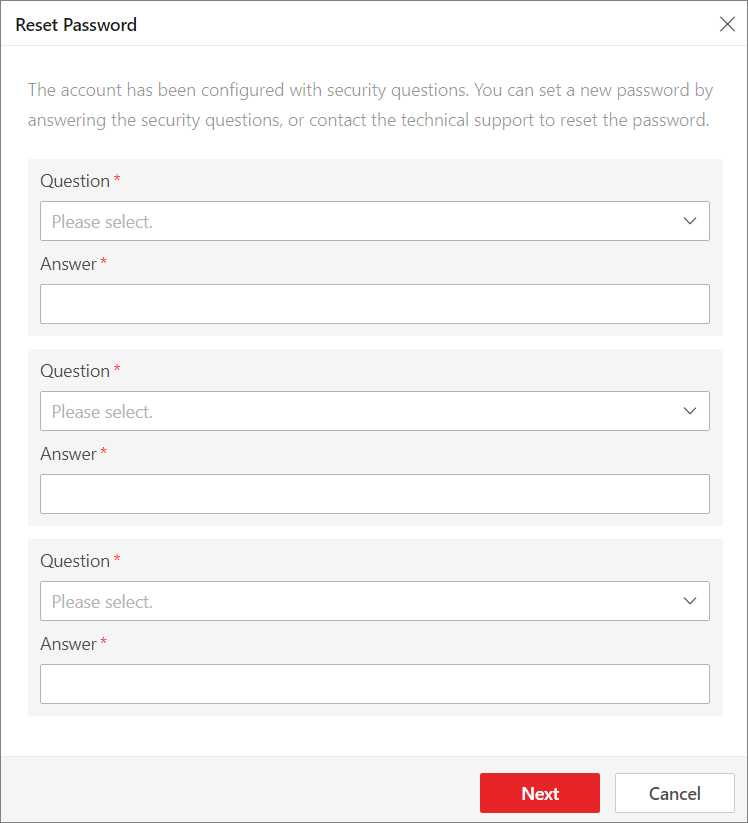 Figure 1 Reset Password for
admin
User
via
Security Questions
Figure 1 Reset Password for
admin
User
via
Security Questions -
If you are the admin user or a normal user whose account is configured with an email address, you can click Get Verification Code and a verification code will be sent to your email address. Enter the verification code you received, set a new password, and confirm the password within 10 minutes.
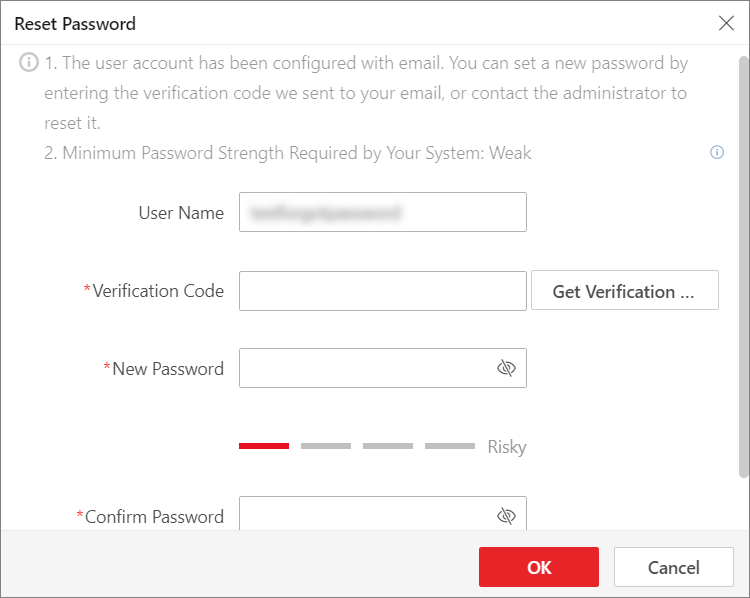 Figure 2 Reset Password via
Verification CodeNote:
Figure 2 Reset Password via
Verification CodeNote:If no email address is set for your normal user account, you need to contact the admin user to reset your password.
-
If you are a domain user, you need to contact the admin user to reset your password.
Note:The password strength can be checked by the system and should meet the system requirements. If the password strength is lower than the required minimum strength, you will be asked to change your password. For setting the minimum password strength, refer to System Security Settings.
CAUTION:The password strength of the device can be automatically checked. We highly recommend you change the password of your own choosing (using a minimum of 8 characters, including at least three kinds of following categories: upper case letters, lower case letters, numbers, and special characters) in order to increase the security of your product. And we recommend you change your password regularly, especially in the high security system, changing the password monthly or weekly can better protect your product.
Proper configuration of all passwords and other security settings is the responsibility of the installer and/or end-user.
-