Review or Undo Applications
As an administrator, after applying for employees' leave, overtime, attendance correction, or check in&out via Mobile Client, you can review (including approve or reject) or undo the application.
-
On the top left, select
 > Integrated Service > Attendance.
 -
Select .
-
(Optional) Click
 to filter the target employee by setting conditions
(such as name, ID, department).
to filter the target employee by setting conditions
(such as name, ID, department). -
Select the target employee, the employee's application flow will be displayed on the right.
-
You can perform the following operations in the Operation column for application review.
-
Click
 to approve the
employee's attendance application.
to approve the
employee's attendance application. -
Click
 to reject the employee's
attendance application.
to reject the employee's
attendance application. -
Click
 to undo the employee's attendance
application.
to undo the employee's attendance
application.
-
-
You can also select multiple employees to review or undo the employee's attendance applications.
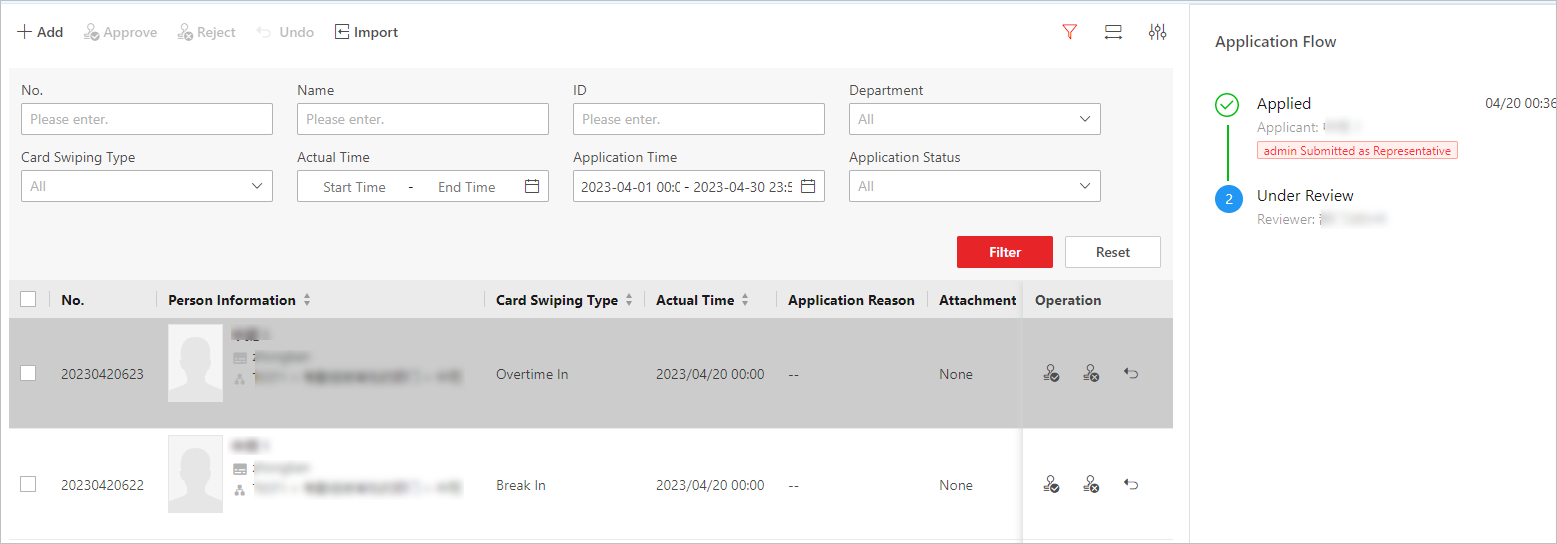 Figure 1 Review or Undo Employees'
Applications
Figure 1 Review or Undo Employees'
Applications -
(Optional) On the upper-right corner, click
 to select the type of self-adaptive column width
(complete or incomplete display of each column title).
to select the type of self-adaptive column width
(complete or incomplete display of each column title). -
(Optional) On the upper-right corner, click
 to select the items for custom display in the
column.
to select the items for custom display in the
column.