How to Apply for Compensation and Manage Applications
For distributors who keep a supply of products from Hikvision at a fixed price in advance, but later sell products at a lower price due to getting project support, you may apply for compensation online. After a compensation application is approved, the compensation amount may be issued to your e-wallet, or you may be compensated by credit notes against receivables or free items.
-
This feature is only available to authenticated channel partners.
-
For details about projects, refer to #GUID-FA01336D-D9C5-4469-B0A9-D0E659380A7F.
Apply for Compensation Using the Portal
You can apply for compensation for projects that are either submitted by you or shared to you. Projects that support the submission of a compensation application should be in Closed Won status and the date of closing should be within three months.
-
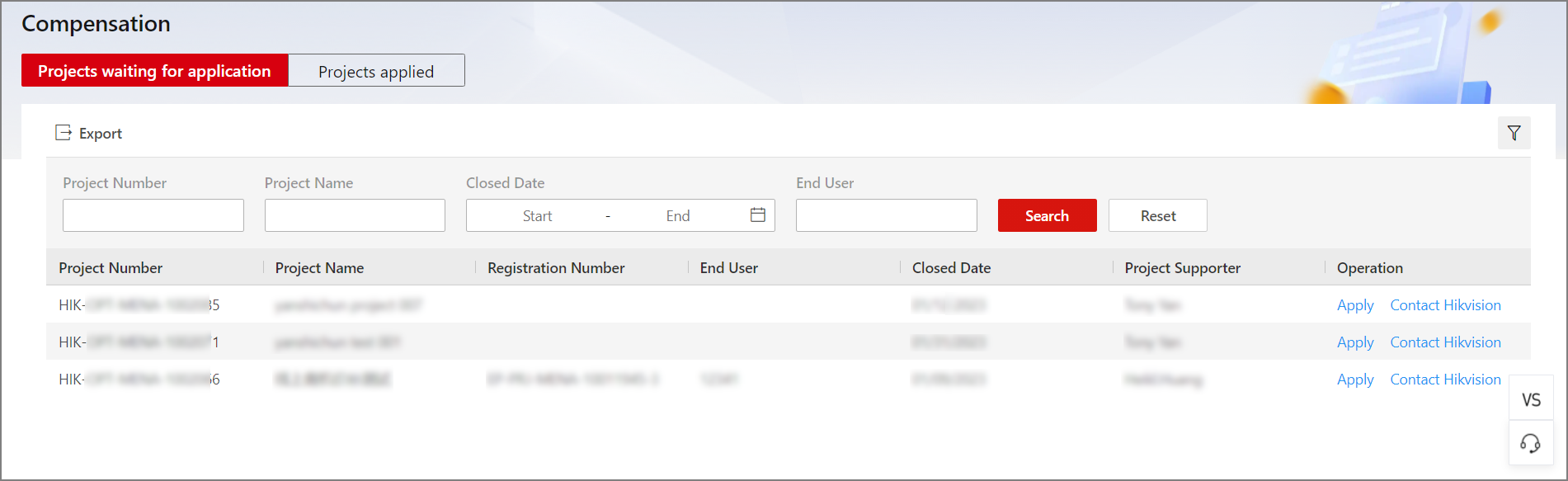
Go to , and select Projects waiting for application.
Figure 1 Projects Waiting for Compensation Application -
(Optional) Click Contact Hikvision in the Operation column of a project to send an email to the project supporter (i.e., Hikvision sales representative), if you have any questions or there is something you would like to tell them before applying.
-
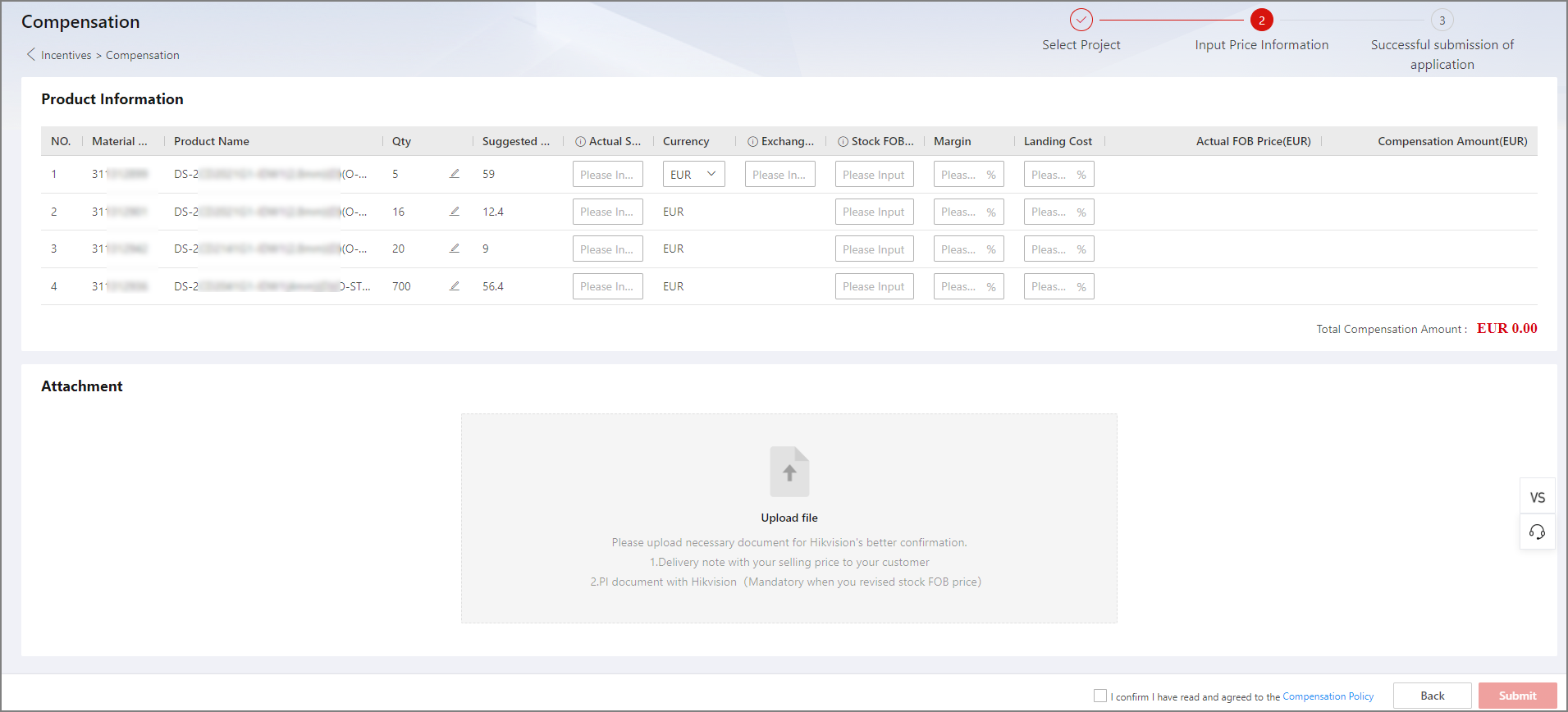
Click Apply in the Operation column of a project to enter the Input Price Information page.
Figure 2 Compensation Application -
In the Product Information field, enter or edit the following price related information accordingly for each product.
- Actual Sales Price
-
If the currency of the actual transaction is different from that of the suggested sales price, enter this field according to your actual situation. Otherwise, the actual sales price should be the same as the suggested sales price.
- Currency
-
Select the currency of the actual transaction.
- Exchange Rate
-
If the currency of the actual transaction is different from that of the suggested sales price, enter the currency exchange rate at the time of the transaction.
NoteIf the currencies are the same, exchange rate will be set to 1 and cannot be edited.
- Stock FOB Price
-
Revise this field if you find a price displayed is incorrect.
- Margin
-
Enter the handling fee of a transaction as a percentage (%).
- Landing Cost
-
Enter the total landed cost for a product as a percentage (%).
-
(Optional) Upload the appropriate attachments (e.g., delivery notes with actual sales prices, PI documents, etc.) according to your actual situation to make it easier to get your application approved.
NoteIf you have revised the stock FOB price for a product above, uploading a PI document is required here. Otherwise your application will be rejected.
-
Read the Compensation Policy, check the box for confirming policy agreement, and click Submit.
A window will pop up for you to confirm the submission. After clicking Confirm, you will land on the successful submission page with relevant details of your application such as the application number, project number, and the total compensation amount.
NoteIf your application fails to be submitted, please contact Hikvision. A failed submission will be saved in Draft status for you to edit and resubmit later.
Manage Submitted Compensation Applications Using the Portal
After you submit a compensation application, you can track the status of your application, edit draft and rejected applications for resubmission, and export all applications.
Go to and select Projects applied.
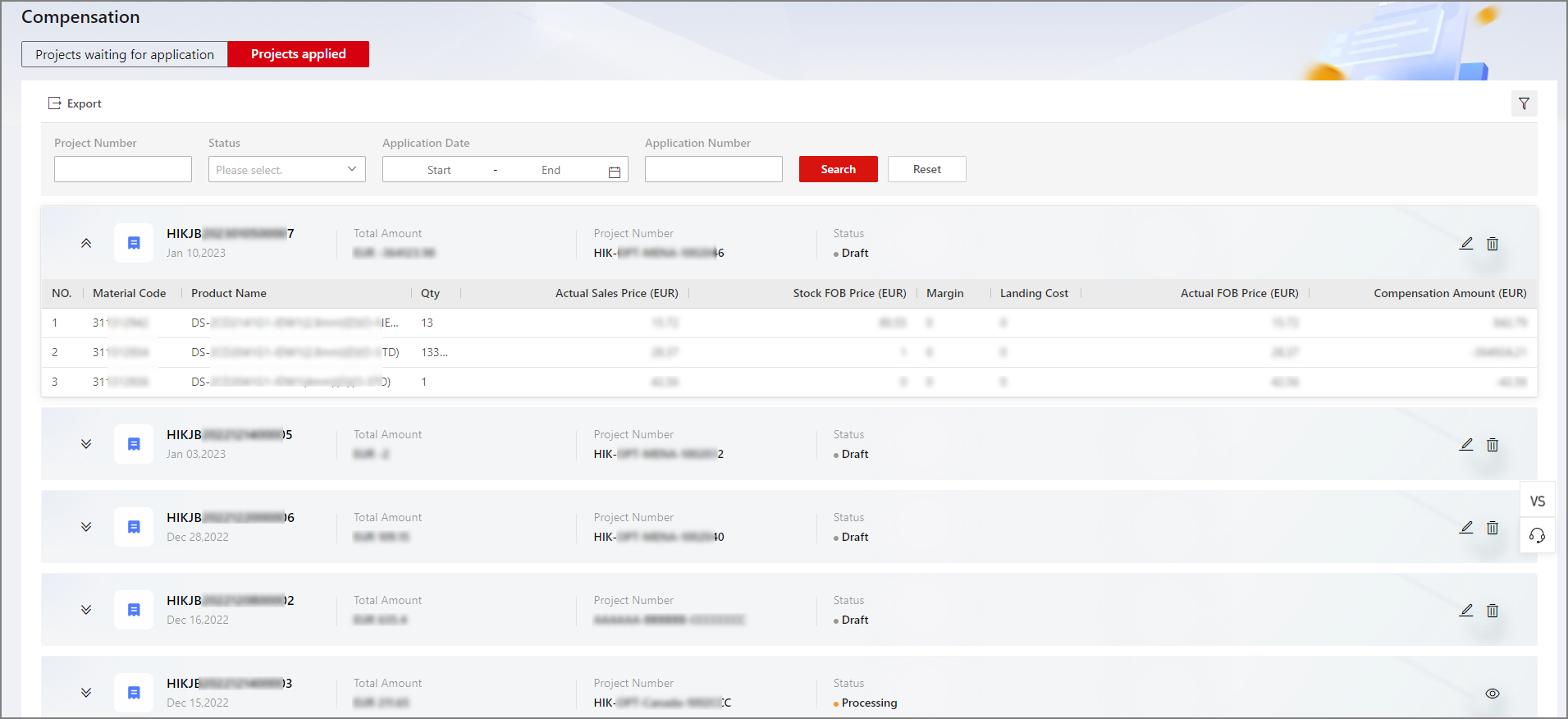
- Application Status
-
- Draft
-
The application has failed to be submitted. Information entered for the latest submission is saved for you to edit and resubmit.
- Processing
-
The application has been submitted and is currently under review.
- Rejected
-
The application has been reviewed by a Hikvision sales representative and is rejected. You can view remarks for your application, make changes to it, and resubmit if needed.
- Completed
-
The application is approved. You will be compensated by one of the following methods: compensation amount issued to your e-wallet, credit notes, or free items.