SIM Data Service: Connect Devices to 4G Network
Pain Points and What Customers Want From Installers
|
Pain Points of Customers |
What Customers Want from Installers |
|---|---|
|
|
What You Can Sell & Offer to Your Customers
-
Clear Service Plan and Easy to Purchase: Hik-Partner Pro saves you the hassle of going to stores in person to purchase data plans. You can get service packages directly online. Data plans offered by Hik-Partner Pro are no-contract and data-only, which can be canceled at any time.
-
A Wide Variety of Options: You can choose from monthly packages that contain different amount of data to suit your customers' needs.
-
Multi-Carrier IoT Connectivity: The SIM cards support extensive connections to multiple carriers, and support switching among carriers for optimal signal strength.
-
Simple to Manage: You can manage the service packages and data usage details of all your SIM cards on the Portal, and receive reminders promptly when data is about to run out or expire.
-
Data Security: Data privacy protection for ensuring data security for your customers.
Step 1: Get SIM Card and Set APN on Devices
To use the data service on a device, you need a SIM card and set the APN on the device.
-
Get a SIM card from your distributor. Some devices themselves include SIM cards already.
-
Open the device's back cover, and insert the SIM card into the device's slot.
NoteThe slot's position may vary depending on the specific model.
-
Set the APN according to the first 6 digits of the SIM card number.
NoteOn some devices, APN is automatically set when you insert a SIM card into the device.
- For wireless security
control panels:
On the device configuration page, go to , enter the APN.
- For 4G cameras:
On the device configuration page, go to , enter the APN.
First 6 Digits of Card No.
APN
890010
data.apn.name
891039
data.apn.name
893204
bicsapn
898830
super
- For wireless security
control panels:
Step 2: Get SIM Data Service Packages
You can purchase the SIM data service packages online in the Service Market in Hik-Partner Pro, or purchase a service key from the local distributor first and then activate by the service key to get the purchased service packages.
The supported purchase methods vary depending on your country/region. Contact the local distributor for details.
Purchase Online Using the Portal
- Go to .
-
In the SIM Data Service area, click Online Purchase to enter the Purchase SIM Data Service Package page.
-
Select the package based on the data amount and SMS allowance and set the quantity of packages to purchase.
NotePackages that contain SMS allowance are exclusive to SIM cards of which the card numbers starting with 898830.
-
Enter the distributor invitation code and the code from Hikvision sales.
NoteBy entering the codes when you purchase services online, you may get some discounts and the distributor/reseller can earn some rebates. For details, refer to How to Earn Commissions as a Distributor/Reseller.
-
Enter your VAT number. The VAT number will be displayed in the payment receipt.
-
Select Credit/Debit Cards as the payment method.
-
Click Checkout to enter the payment page and finish the payment.
Get Packages by Service Key Using the Portal
-
Contact your local distributor and purchase a service key from them.
-
Go to .
-
In the SIM Data Service area, click Activate by Service Key.
-
In the Service Key field, enter the service key.
-
Click OK.
Step 3: Activate SIM Data Service for SIM Card
Activate the Service for SIM Card Using the Portal
-
Add the SIM card to Hik-Partner Pro by one of the following ways.
Method
Steps
Auto Add SIM Card
This method is only applicable to SIM cards inserted in devices which are already added to the site.
-
Go to .
-
Click the site.
-
Click .
-
Wait for cards to be auto added to the site. Click OK.
Add SIM Card Manually
Enter the card No. to add SIM cards one by one.
To add a SIM card to Hik-Partner Pro:
-
Go to .
-
Click Add SIM Card Manually.
-
Enter the card number.
-
Click Confirm.
To add a SIM card to a specific site on Hik-Partner Pro:
-
Go to .
-
Click the site.
-
Click .
-
Enter the card number.
-
Click Confirm.
-
-
Turn on Activate.
-
Select a type of service package.
-
Turn on Auto Renewal.
-
Click Confirm.
Step 4: Manage SIM Cards and SIM Data Service Packages
Manage SIM Data Cards Using the Portal
Go to .
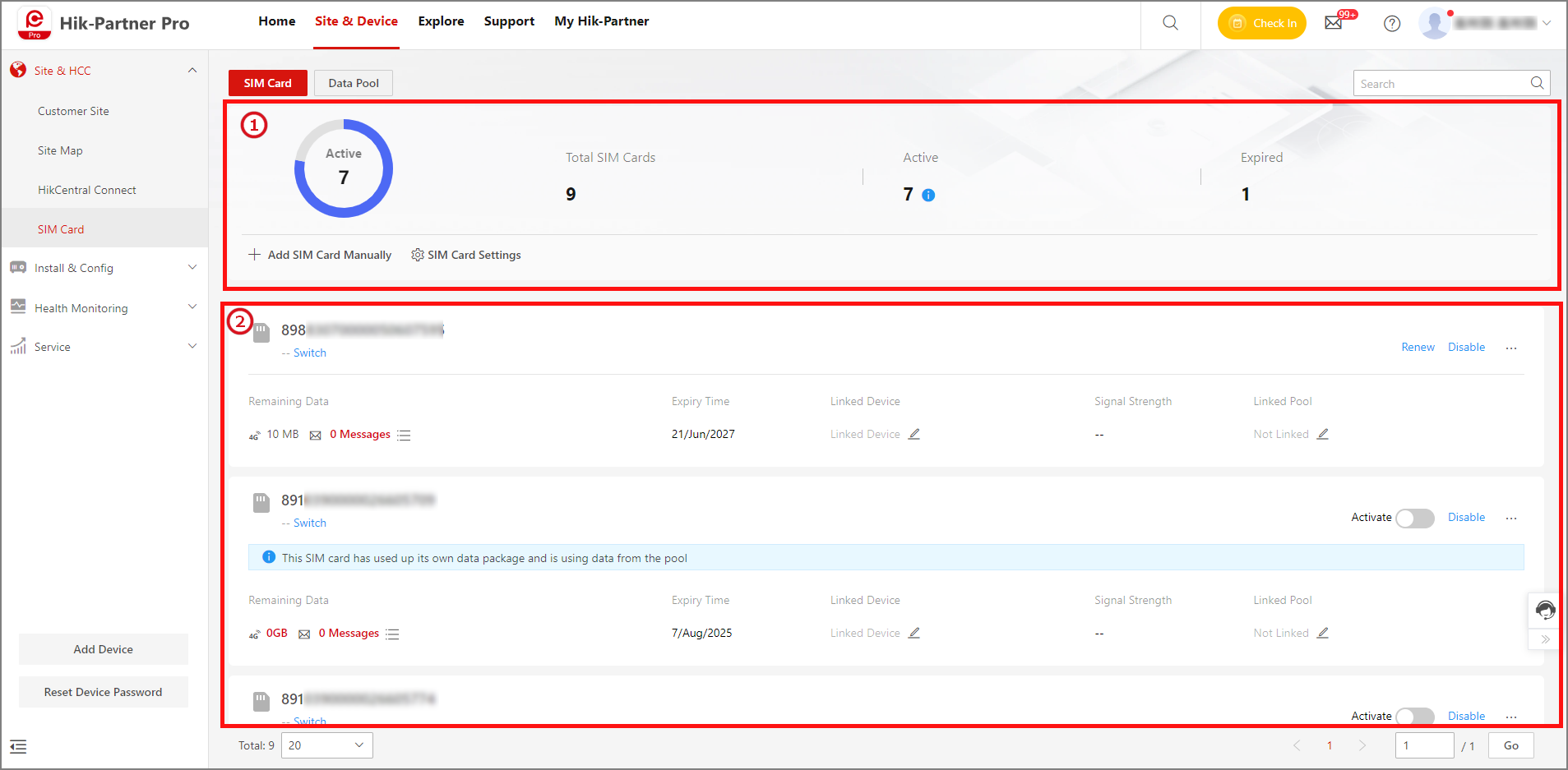
|
Area No. |
Operation |
Description |
|---|---|---|
|
1 |
View SIM Card Status |
View the number of SIM cards with active/expired data service. |
|
1 |
Add SIM Card Manually |
Add a SIM card by entering the SIM card number. |
|
2 |
View SIM Card Details |
View remaining data, expiry time, signal strength, etc. |
|
2 |
Activate/Renew Service |
Turn on Activate or click Renew to activate/renew the SIM data service for the card. |
|
2 |
Suspend/Resume SIM Card |
Click Suspend/Resume to suspend/resume the data service for the SIM card. |
|
2 |
Enable Service Auto Renewal |
Click > Auto Renewal. |
|
2 |
Check Usage Details |
Click > Details to view data usage details in the last 30 days. |

Manage SIM Data Service Packages Using the Portal
Go to .
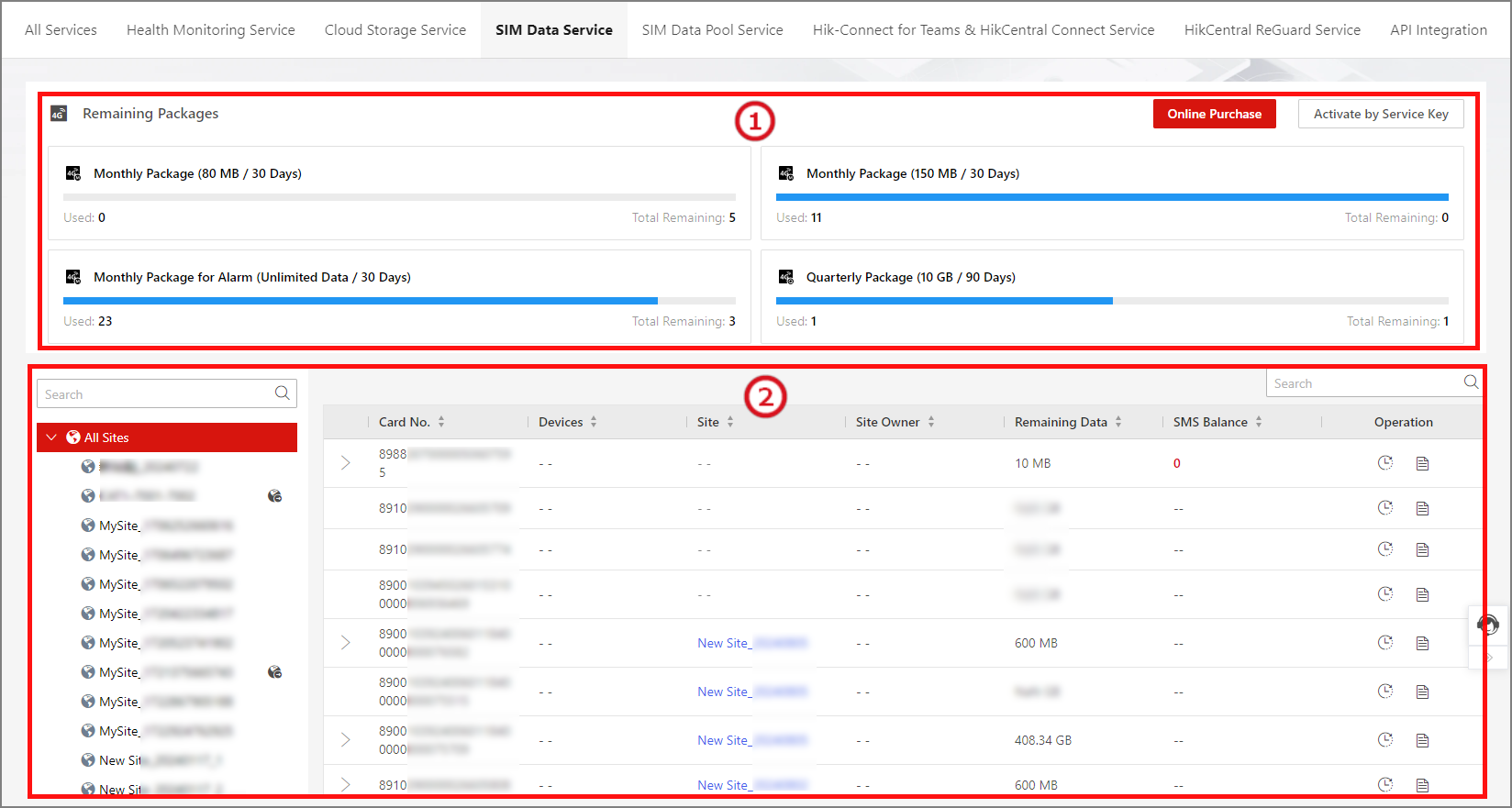
|
Area No. |
Operation |
Description |
|---|---|---|
|
1 |
View Remaining Packages & Purchase More |
View the used number and remaining numbers of each type of packages. Click Activate by Service Key or Online Purchase to get more packages. |
|
2 |
View Data Balance |
View the remaining data of each SIM card. |
|
2 |
Renew Service |
Click in the Operation column. You can choose to enable Auto Renewal. |
|
2 |
Check Usage Details |
Click in the Operation column to data usage details in the last 30 days. |
 in the
Operation column. You can choose to enable
in the
Operation column. You can choose to enable  in the
Operation column to data usage details in the last 30
days.
in the
Operation column to data usage details in the last 30
days.