Configure Advanced Parameters
-
Click Advanced to set the advanced parameters.
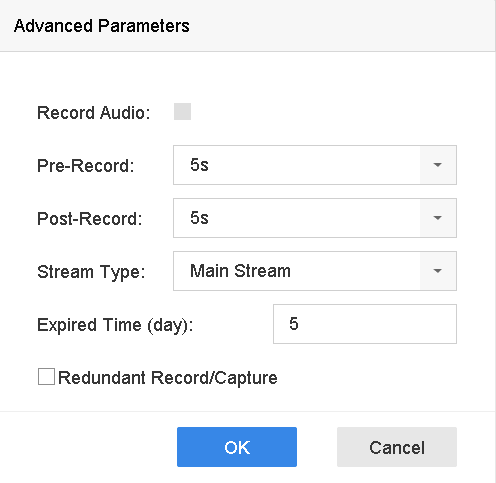 Figure 1 Advanced Record
Settings
Figure 1 Advanced Record
Settings- Record Audio
-
Enable or disable audio recording.
- Pre-record
-
The time you set to record before the scheduled time or event. For example, when an alarm triggers the recording at 10:00, and if you set the pre-record time as 5 seconds, the camera records at 9:59:55.
- Post-record
-
The time you set to record after the event or the scheduled time. For example, when an alarm triggered recording ends at 11:00, and if you set the post-record time as 5 seconds, it records till 11:00:05.
- Stream Type
-
Main stream and sub-stream are selectable for recording. When you select sub-stream, you can record for a longer time with the same storage space.
- Expired Time
-
The expired time is period for a recorded file to be kept in the HDD. When the deadline is reached, the file will be deleted. If you set the expired time to 0, the file will not be deleted. The actual keeping time for the file should be determined by the capacity of the HDD.
- Redundant Record/Capture
-
By enabling redundant record or capture you save the record and captured picture in the redundant HDD.