Configure Overtime Parameters
Overtime is the amount of time a person works beyond scheduled work hours. You can configure parameters, including work hour rate, overtime level, and attendance status for overtime, for workdays, weekends, and holidays.
- Overtime on Workday/Weekend
-
- Calculation Mode
-
Select a calculation mode.
- By Total Work Hours
-
Overtime is calculated according to the extra work hours that exceed the required work hours.
- OT Duration Calculation Mode
-
Select a method for overtime duration calculation.
- Fixed
-
Overtime duration is fixed regardless of the actual overtime. You need to set a fixed duration in the Overtime Duration field.
- Actual
-
Count the actual duration of the overtime. You need to set a minimum threshold for a valid overtime.
For example, if you set the threshold to 60 minutes:
-
Overtime duration is 0 if a person works for 59 minutes longer than the required work hours;
-
Overtime duration is 61 if a person works for 61 minutes longer than the required work hours.
-
- By Time Points
-
Overtime duration is calculated according to the extra work hours earlier than the start-work time or later than end-work time in one day.
You can enable Count Early Check-In as OT and Count Late Check-Out as OT to set the overtime duration calculation mode respectively.
- OT Duration Calculation Mode
-
Select a method for overtime duration calculation.
- Fixed
-
Overtime duration is fixed regardless of the actual overtime. You need to set a fixed duration in the Overtime Duration field.
- Actual
-
Count the actual duration of the overtime. You need to set a minimum threshold for a valid overtime.
For example, if you set Earlier than Check-In Time for Mark as Valid Overtime to 30 minutes, and the start-work time is 9:00:
-
Overtime duration is 0 if a person checks in at 8:31.
-
Overtime duration is 31 if a person checks in at 8:29.
-
- Overtime Level Settings
-
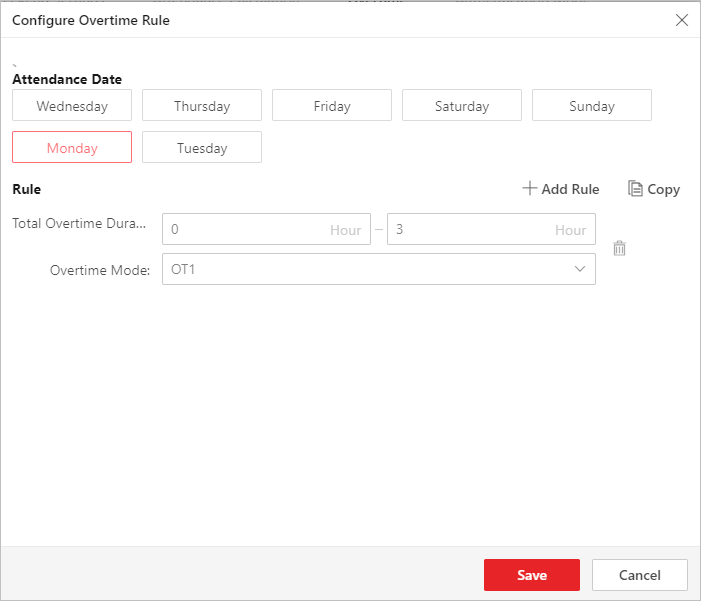
Click Configure Rule to open the Configure Overtime Rule window. Select an attendance data, and click Add Rule to set a total overtime duration and select an overtime mode. You can click Copy to copy another day's overtime rule. The total work hours will be calculated according to the work hour rate of each overtime level.
Figure 1 Configure Overtime Rule - Overtime on Weekends
-
You can switch on Overtime on Weekends and set the valid overtime threshold. Then when a person's work hours on weekends are less than the threshold, the overtime will be 0.
- Overtime on Holidays
-
- If Works Longer than Mark as Valid Overtime
-
Set a minimum threshold for a valid overtime.
- Set Max. Overtime
-
Switch on to set an upper limit for the overtime duration in the If Works Longer than Mark as Invalid Overtime field. Exceeded work hours will not be counted as valid overtime.
- Overtime Level on Holiday
-
Set the overtime level for each holiday.
You can select multiple holidays and click Batch Set Overtime Level to batch set the overtime level, or set the overtime level for each holiday separately.
Note-
To add a new holiday, click Add Holiday.
-
To edit holidays, click Holiday Settings.
-