Set Basic Security Parameters
System security is crucial for your system and property. You can lock IP address to prevent malicious attacks, enable auto lock the Control Client, and set other security settings to increase the system security.
Select on the left.
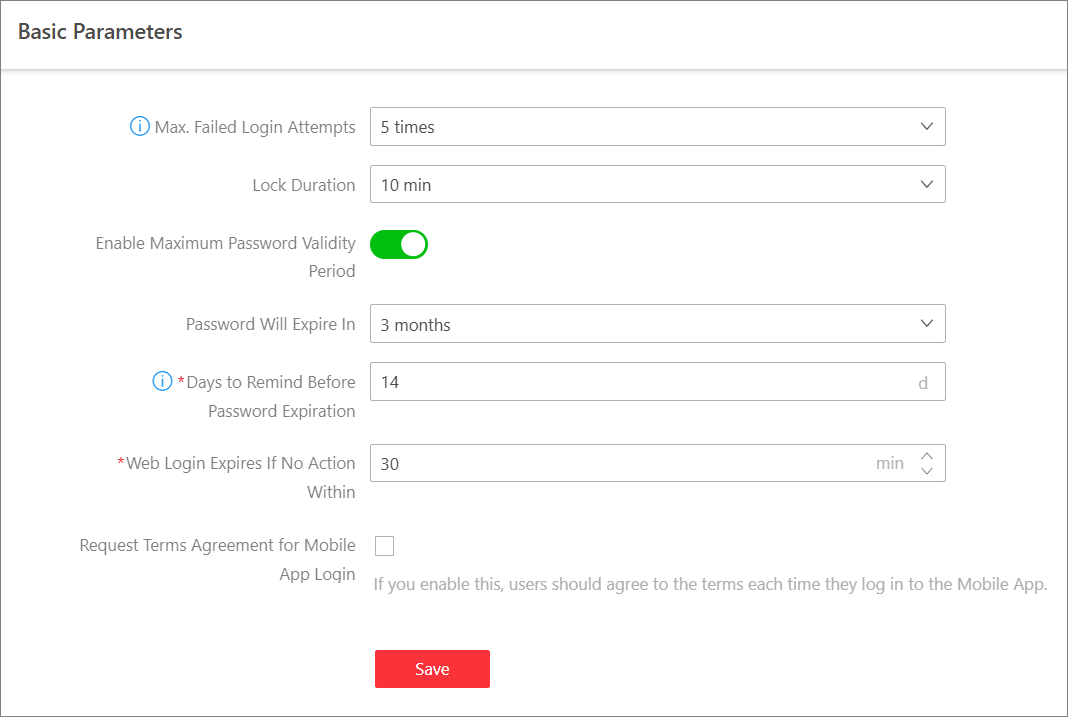
- Max. Failed Attempts Before Lockout
-
Select the maximum allowable login attempts. Failed login attempts include failed password attempt and failed verification code attempt.
- Lock Duration
-
Set the lock duration for this IP address. During the lock duration, the login attempt via this IP address is not allowed.
- Minimum Password Strength
-
Define the minimum complexity requirements that the password should meet.
- Enable Maximum Password Validity Period
-
Force user to change the password when the password expires.
- Password Will Expire In
-
Set the maximum number of days that the password is valid. After the maximum number of days, you should change the password. You can select the predefined time length or customize the time length.
- Days to Remind Before Password Expiration
-
Set days to remind you at each time you login or in the small hours of each day by sending an email notification before password expiration.
- Web Login Expires If No Action Within
-
Set minutes after which the Web login will expire if there is no actions during the set minutes.
- Auto Lock Control Client
-
The Control Client will be automatically locked after a time period of inactivity on the Control Client. You can select the predefined time period or customize the time period.
- Auto Log Out Mobile App
-
The Mobile Client will be automatically logged out if there is no operation in a set time period. You can select the predefined time period or customize a time period.
- Request Terms Agreement for Mobile Client Login
-
If it is checked, users should agree to the terms each time they log in to the Mobile Client.
- Double Authentications
-
Select the authenticator and the users who need authentication. Double authentications means the users who need authentication should let the authenticator enter the user name and password so that they can use the functions of manual recording, video playback, and video exporting. Resources on the site support double authentication. Only one resource can be configured for a user who needs authentication.