Import Person Authentication Events from Devices to the Client
Person authentication events include normal and abnormal authentication records. When the system misses events, you can import events stored in devices to the system.
Click .
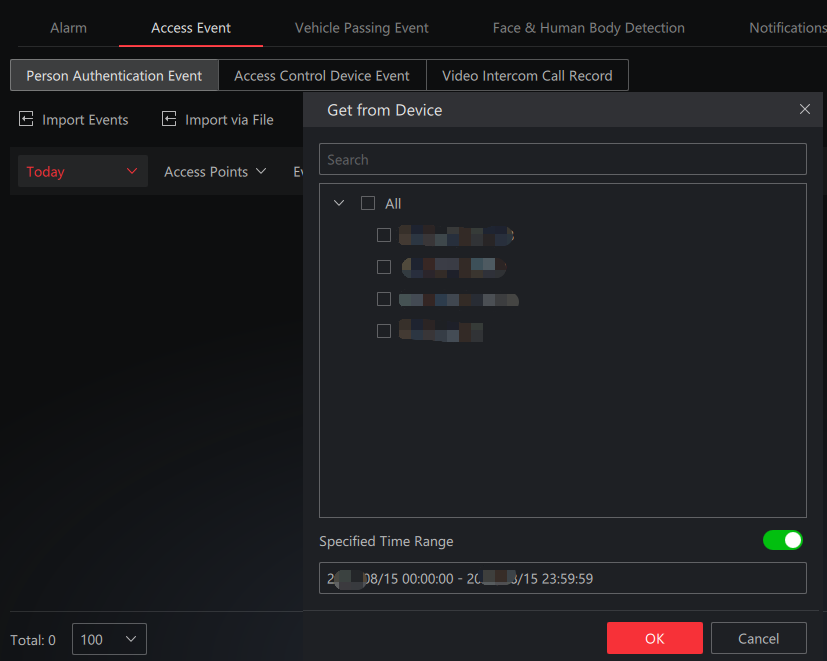
For online devices, you can import events by selecting devices. Specifying the time range of generating events is supported.
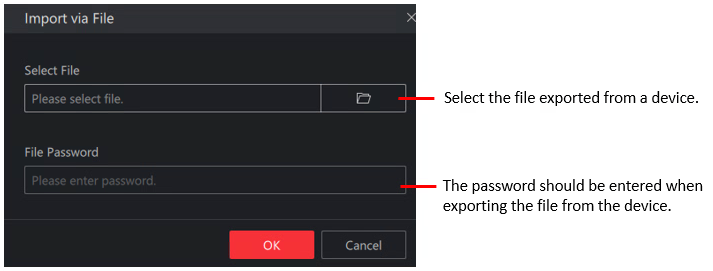
For devices that are unable to connect to the network, or devices are disconnected from the network which cannot restore for a long time, events can be imported via a CSV file. Plug a flash drive in the device, and start exporting events to the flash drive from the device. When the exporting finishes, plug the flash drive to the PC, and start importing the file.
-
Only encrypted files can be imported.
-
The file name should meet the format requirement, e.g. recordlist_ device serial No. For example, recordlist_FC2922753.