Video Intercom
People can call the system users via access control devices (including MinMoe face recognition terminals) and video intercom devices, and users can also call the device via the client.
Configure Parameters
Before two-way audio, you can configure parameters of calls from devices to the current client, and configure call recipients for different devices.
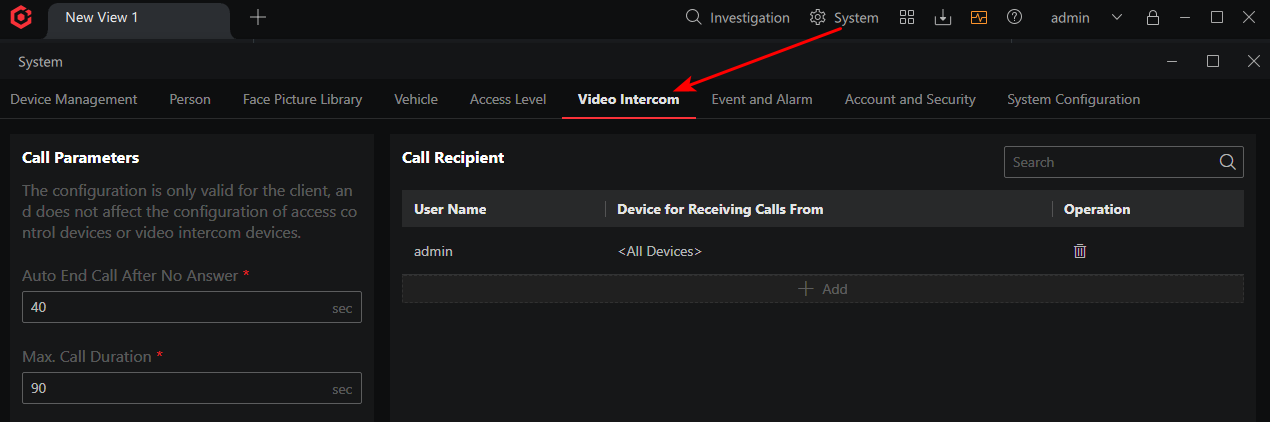
- Automatic Call End Time After No Answer
-
If a device calls the client and no one answers the call, the call will be ended automatically after the duration you set.
- Max. Call Duration
-
The Max. duration of a talk between the client and a device.
- Call Recipient
-
Select different devices for different users so that they can receive calls from different devices.
Video Intercom Call
You can call the device by the following two ways:
-
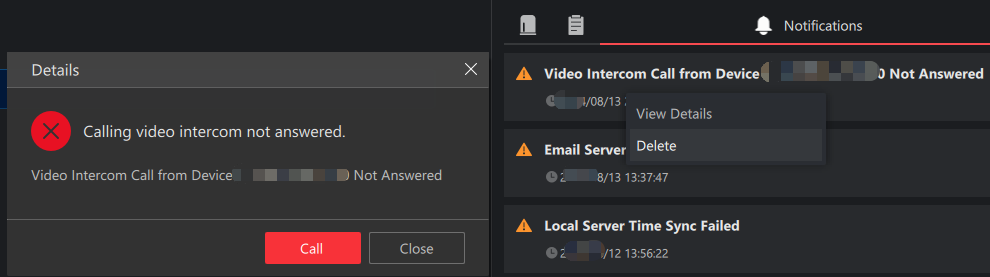
If a person called the client and the call was not answered, a notification will be displayed on the notification panel. Right-click the notification and select to call the device.
Figure 2 Call Device -
In the live view window of a camera linked to a door, click

For details about how to search for video intercom call records, see Search for Video Intercom Call Records.